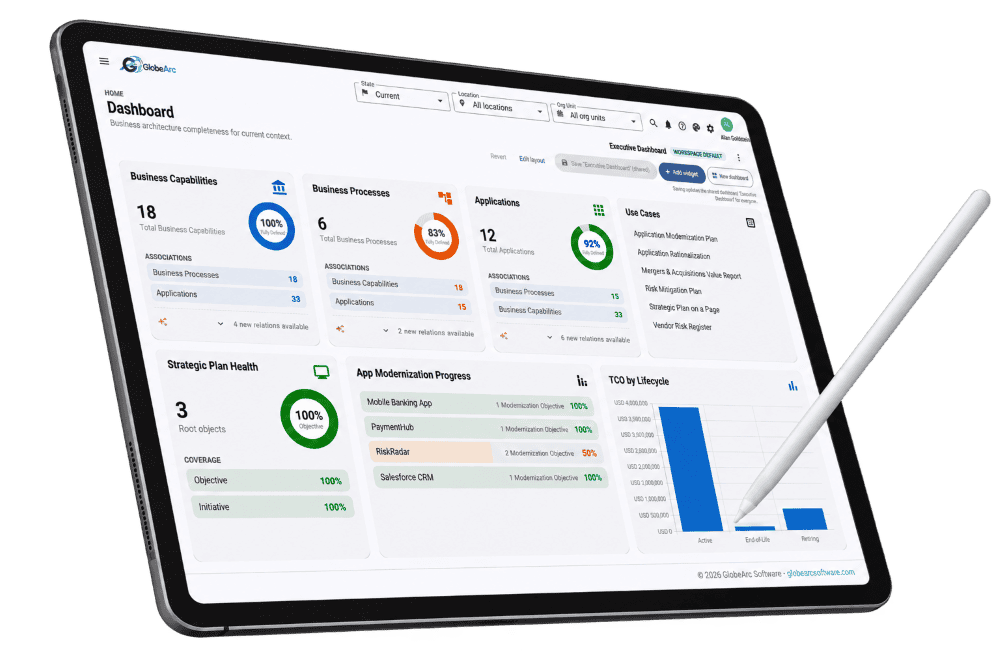
Most organizations don’t start out saying, “We think we have redundant applications.” They start by saying they need to reduce IT spend or get to market faster. When you look a little deeper, a large share of that spend is sitting in the application portfolio, and a large share of the complexity slowing things down is too.
That’s usually where the conversation about redundant applications begins. In my experience working across both Enterprise Architecture and Business Process Management, finding applications that overlap is the easy part. Understanding what actually depends on them is where the real work, and the real value, is.
What Makes an Application Redundant?
In this space, when people talk about redundant applications, they usually mean multiple applications that cover the same business or technical capabilities. Applications are associated with capabilities, so you can look across the portfolio and see where several applications support the same one.
That’s a good starting point, but it’s only one view. You also need to look at:
- Which locations and Org Units use each application
- How they overlap today, and what that should look like in the future
- Regulatory concerns that may require a specific application in a specific place
- How each application is used in customer-facing processes
Some of that is easy to pull out on a single report. Some of it is difficult, because you have to understand how applications, processes, capabilities, and organizations all tie together.
Why Business Capability Overlap Doesn't Always Mean Application Redundancy
I’ve worked with several companies where, on the surface, two or three applications supported the same capability. Take CRM as an example. Three applications all support it, so it looks like a clear case of redundancy.
Look closer and the picture changes:
- One application is used in multiple locations around the globe. Another is used in only one location.
- One of them connects to three or four different business capabilities.
- Another connects to two, and the third supports only CRM.
Some of the differences are driven by regulatory requirements, or by whether an application is even available in the location where it’s needed. - Some of it comes down to how the organization is split. When a company operates in silos, each silo has the same capabilities but associates its own applications to them until everything is brought together.
None of that shows up if you stop at “three applications, one capability.”
How Application Value Charts Support Rationalization Decisions
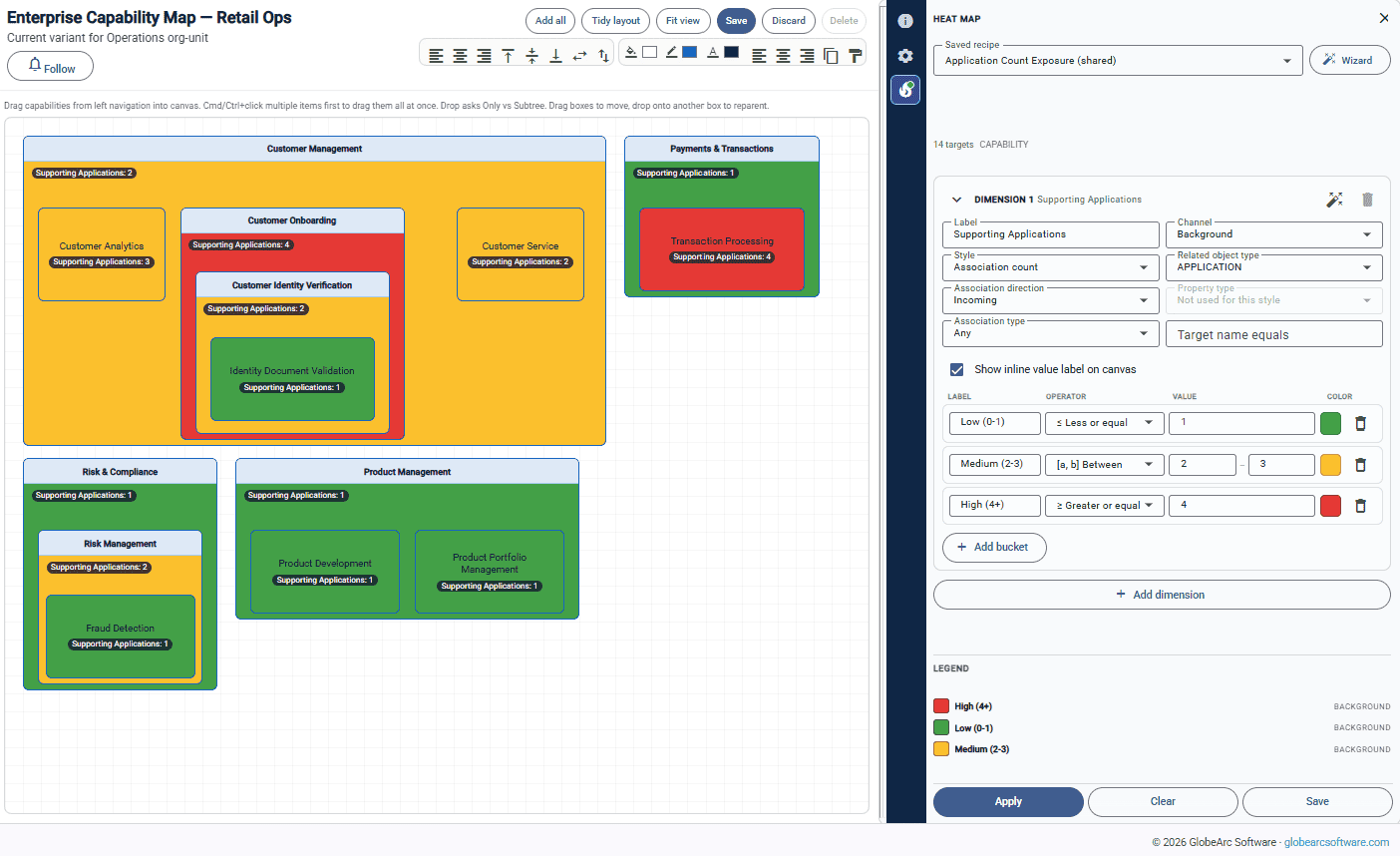
A business capability model is the best place to see overlap. By mapping applications to business capabilities, organizations can determine how many applications support the same capability and identify potential redundancies.
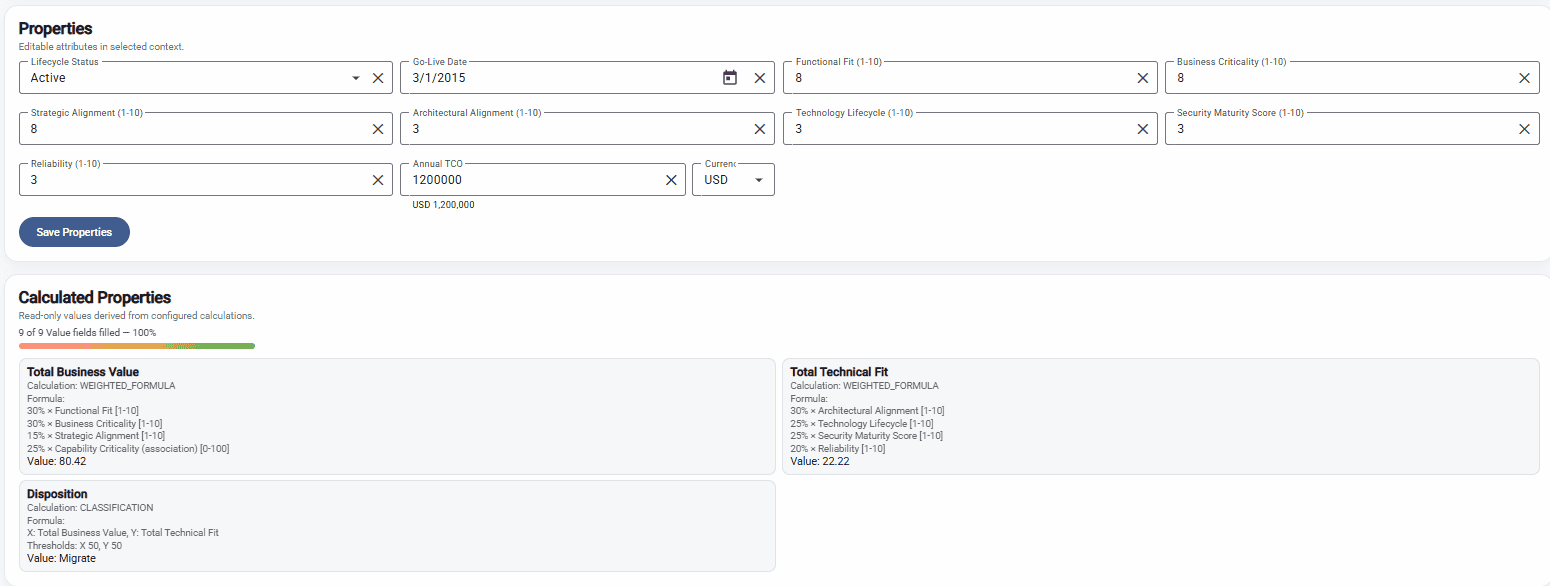
The next step is to evaluate each application against key attributes, including its go-live date, planned end-of-life date, functional fit, business criticality, strategic alignment, capability criticality, architectural alignment, technology lifecycle, security maturity, reliability, and annual total cost of ownership (TCO).
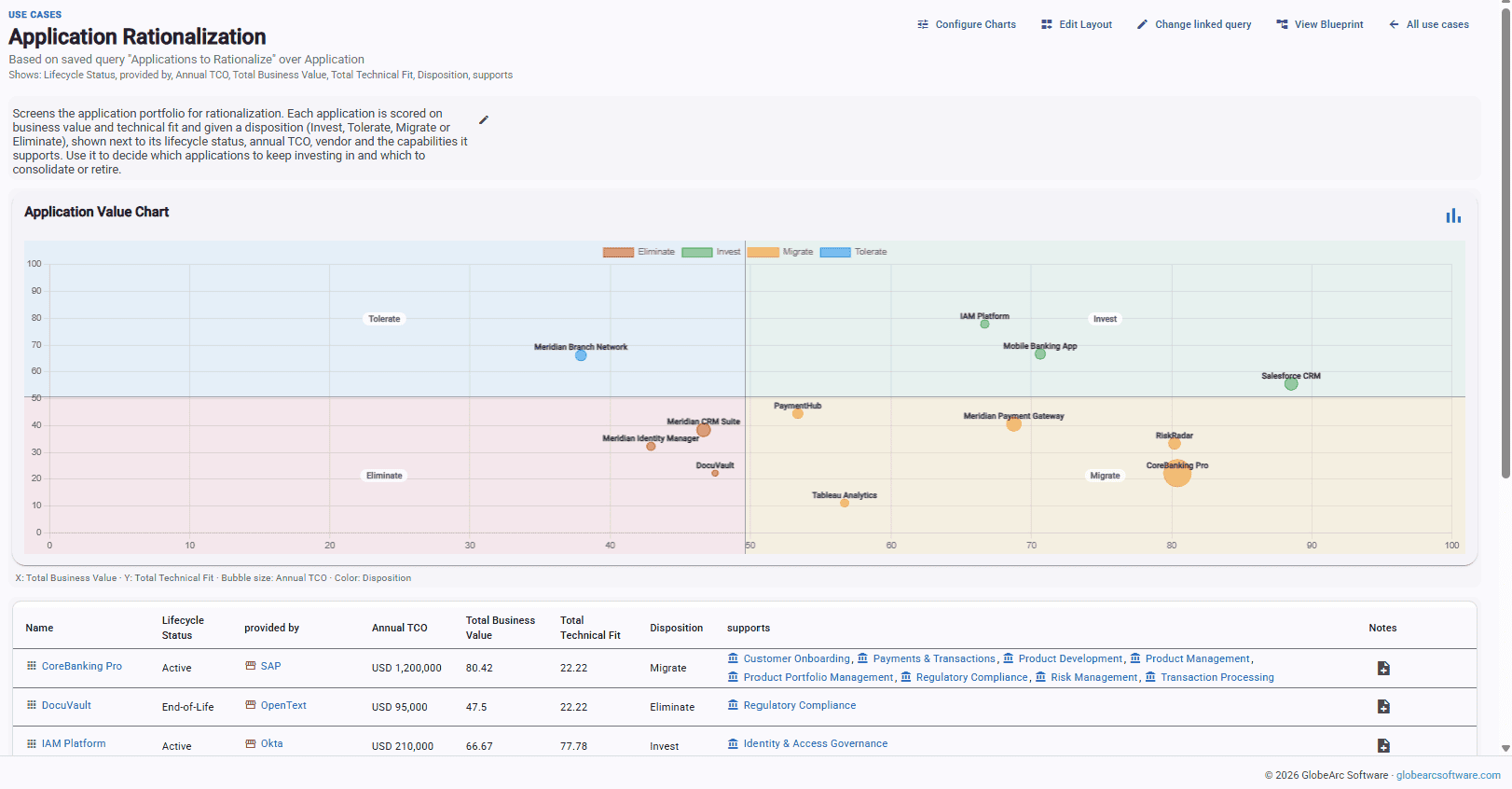
These attributes help organizations assess business value and technical fit, allowing applications to be plotted on an Application Value Chart. The resulting analysis helps identify candidates for retirement, consolidation, or further investment.
However, just because an application lands in a particular quadrant doesn’t mean that’s an instant answer.
Mergers and acquisitions illustrate why additional evaluation is necessary. When two companies merge, both may rely on different applications to support the same business capability. For example, one organization may use Salesforce, while the other operates a different CRM platform. Both applications may serve legitimate business needs, making neither inherently redundant.
The decision requires evaluating which application best supports the combined organization's future strategic direction, while also considering its dependencies on existing business processes, particularly those directly affecting customers.
Where Business Processes Change the Picture
This is where the integration between Enterprise Architecture and Business Process Management becomes so important. Once you start looking at the processes, you start to understand how those applications are actually used:
- Where do the inputs go in?
Who is putting those inputs in? - Which stakeholder is responsible for the task of getting that information into the application?
- What data comes out of it and is used for decision-making?
The most impactful processes are the customer-facing ones, but the same questions apply to internal processes as well.
For a closer look at what goes wrong when process context is missing, see Why Application Rationalization Fails Without Process Context.
The Hidden Risks of Application Rationalization
Application rationalization and IT cost reduction decisions affect more than technology. They also affect the people, business processes, and institutional knowledge required to keep critical systems operational.
I know of companies that reduced costs by eliminating departments or positions without fully understanding their role in supporting business-critical applications. While the immediate savings in personnel costs may be measurable, the loss of application expertise can create operational risks that are much harder to anticipate.
When employees with specialized system knowledge leave, organizations may lose the ability to troubleshoot issues, maintain applications, implement updates, or support essential business processes. These gaps can disrupt operations and directly affect customer-facing services.
This is why effective application portfolio management requires more than identifying redundant applications and evaluating their total cost of ownership (TCO). Organizations must also understand the relationships between applications, business processes, organizational units, and the people responsible for maintaining them.
Without these connections, cost-cutting decisions may deliver short-term savings while introducing long-term operational risks and hidden costs.
How to Identify Redundant Applications: A Step-by-Step Approach
Identifying redundant applications requires a structured approach that combines application portfolio management, business capability mapping, and business process analysis. The following steps help organizations uncover application overlap, evaluate dependencies, and identify opportunities to reduce IT costs and operational complexity without disrupting critical business processes.
1. Start With the Full List of Applications
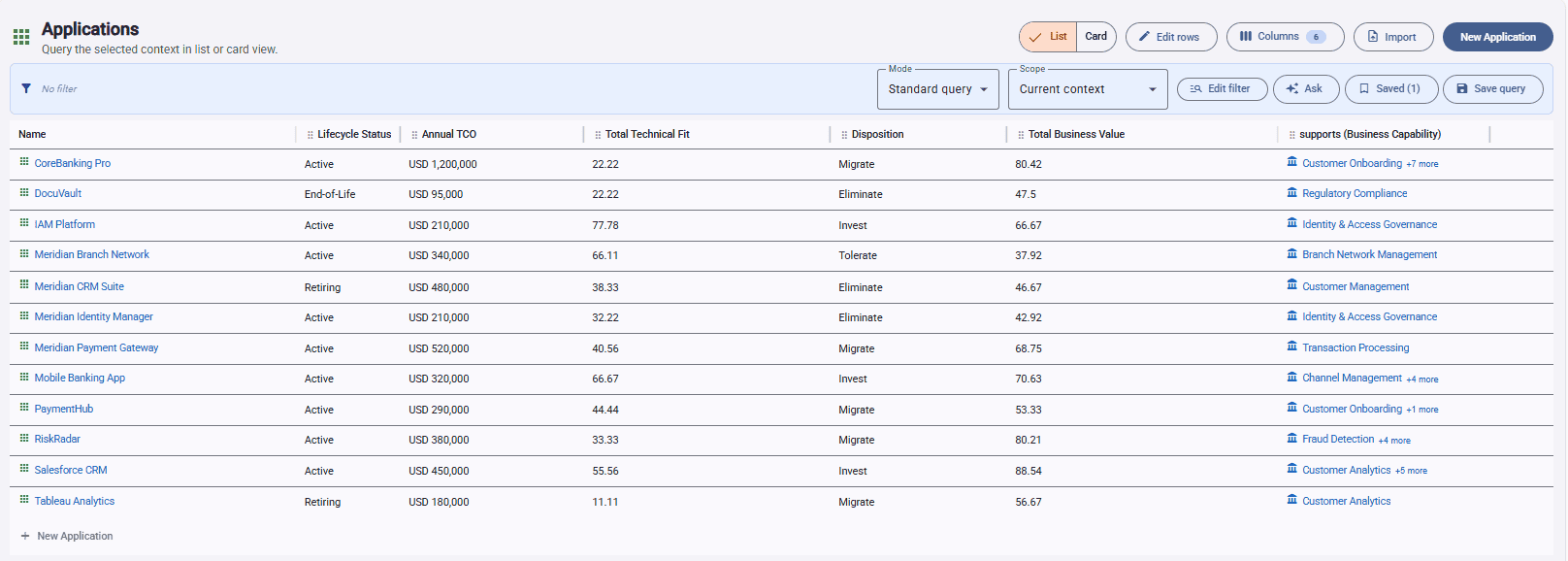
Start by creating a comprehensive inventory of applications used across the organization. This should include applications managed by IT as well as those used independently by individual departments or Org units.
A centralized application inventory establishes visibility into the existing technology landscape and provides the foundation for identifying redundancies, evaluating application value, and making informed rationalization decisions.
2. Associate Applications to Business Capabilities
Use a business capability model to identify which applications support specific business functions and capabilities.
Mapping applications to business capabilities makes it easier to identify areas where multiple systems serve similar purposes. For example, several applications supporting customer relationship management may indicate potential opportunities for consolidation.
However, capability overlap alone does not establish that an application is redundant. Further analysis is necessary to understand how each application supports business operations.
3. Understand Where Each Application Is Used
Once potential overlaps are identified, determine where and how each application is used across the organization. This analysis should examine two critical dimensions:
- Business process dependencies: Identify which business processes rely on each application, including where information is entered, processed, retrieved, or used to support operational decisions.
- Organizational unit dependencies: Determine which departments, teams, locations, or organizational units use each application and how essential it is to their daily operations.
Connecting applications to business processes and organizational units provides a clearer picture of their operational importance.
This helps organizations distinguish between applications that genuinely duplicate functionality and those that support unique business requirements, reducing the risk of retiring systems that remain essential to critical operations.
4. Look at the Vendor Connections
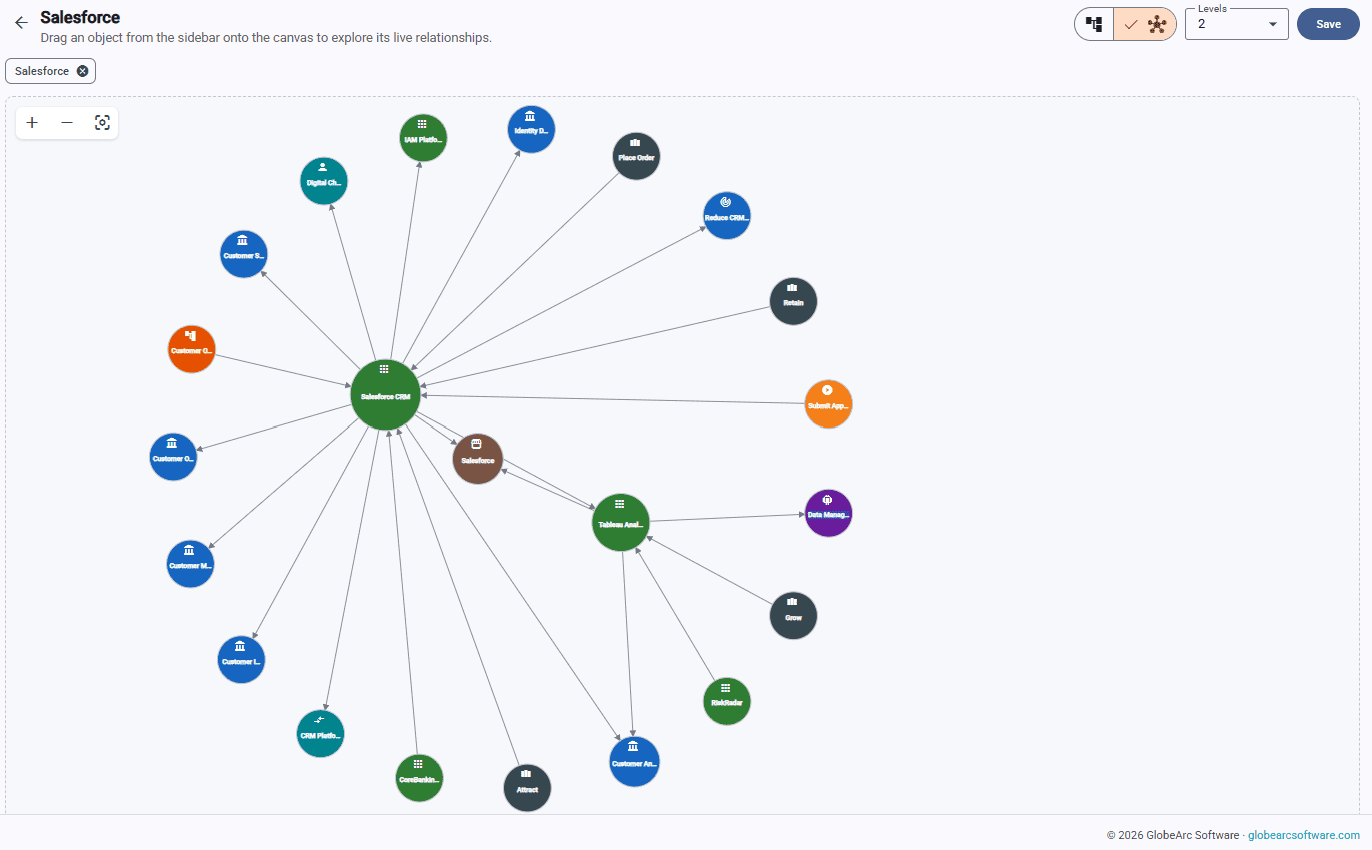
You may have a group of applications that all come from the same vendor. Meanwhile, another capability has three applications supporting it, and one of those is from a vendor that already provides your organization with several other applications. That relationship can change which application makes the most sense to keep.
5. Build the Spider Web
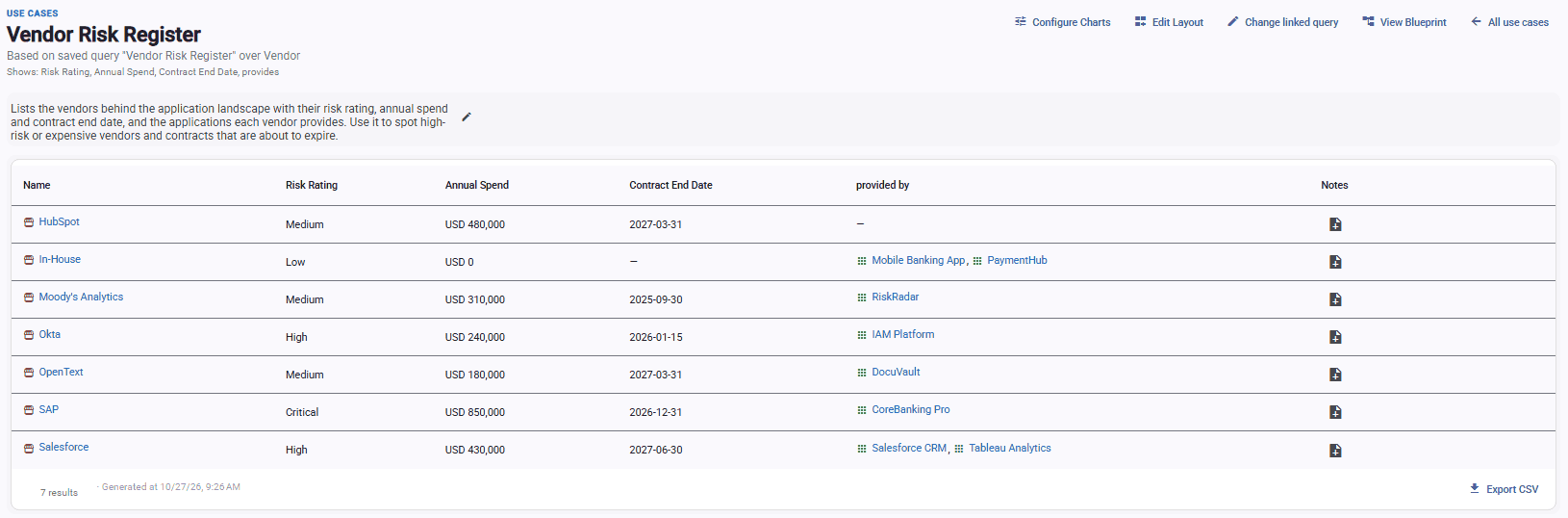
Effective application rationalization requires understanding how applications connect to the broader business and technology environment.
By bringing together the application inventory, business capability model, business processes, organizational units, and vendor relationships, organizations can build an interconnected view of their application portfolio.
This network of relationships reveals how applications support different business functions, which processes depend on them, and how changes to one system may affect other areas of the organization.
Mapping these dependencies enables more accurate impact analysis, helping organizations identify opportunities for application consolidation while minimizing the risk of disrupting critical business processes.
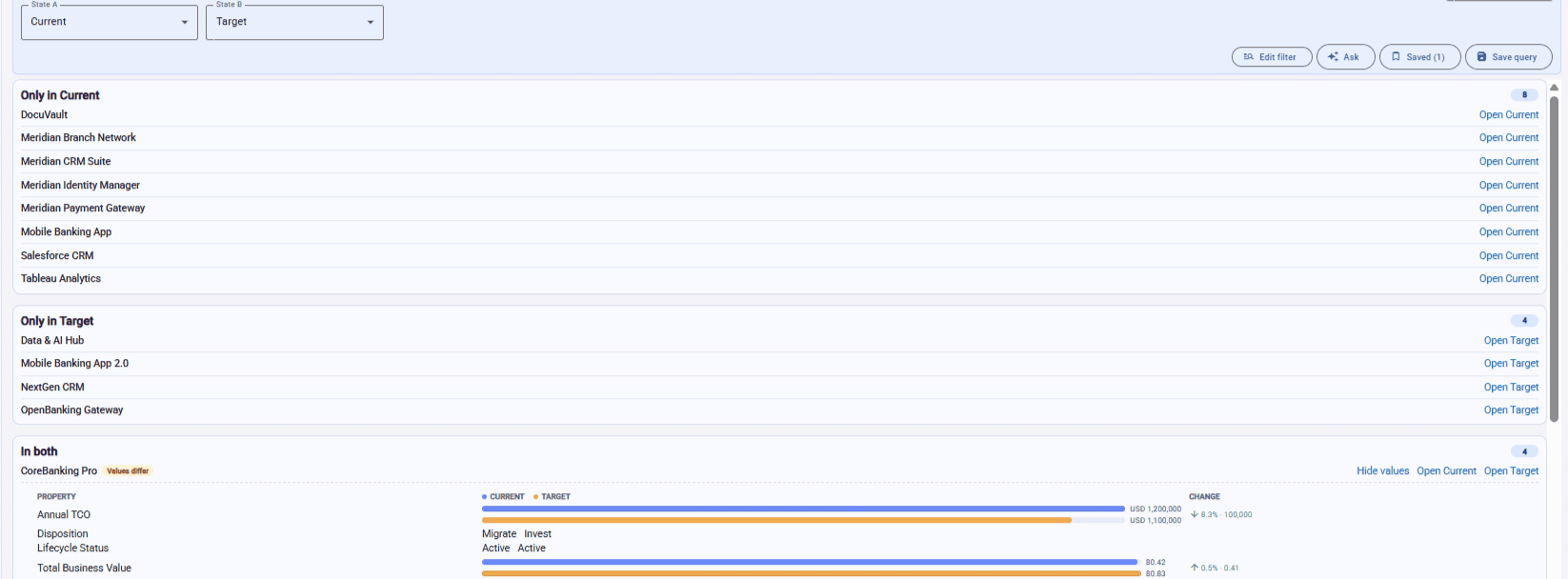
6. Compare Today With the Future
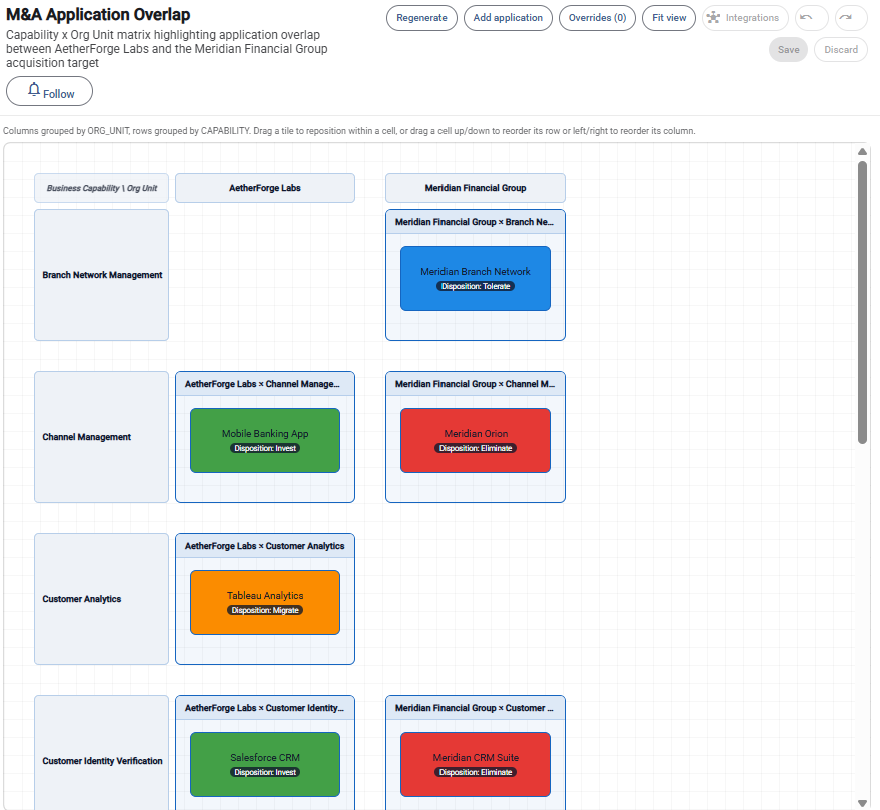
Look at how things run today and how they should run in the future. Reducing the number of applications is one way to reduce cost. It’s also one way to get to market faster, because there’s less complexity in the organization. By reducing that complexity and simplifying the business processes, it becomes easier to move work through those processes and get to the customer of that process faster.
7. Score Each Application
Evaluate each application's business value and technical fit using a consistent scoring framework.
Begin by working with application owners to establish essential lifecycle information, including the application's go-live date and any planned end-of-life or end-of-support dates communicated by the vendor.
Each application is then evaluated against two primary dimensions, with individual attributes scored on a scale of 1 to 10:
- Business value (50%): Measures how effectively an application supports organizational needs through functional fit, business criticality, strategic alignment, and capability criticality.
- Technical fit (50%): Assesses the application's technical suitability and sustainability based on architectural alignment, technology lifecycle, security maturity, and reliability.
Each property has its own weight within those two areas, and each one needs a clear definition. If a client hasn’t done this before, we sit down together and talk through examples of what a lower score and a higher score look like for every property.
8. Plot the Application Value Chart and Assign a Disposition
The weighted scores give you a total business value and a total technical fit for each application, which are plotted on the Application Value Chart. Looking at that chart alongside each application’s TCO and lifecycle status, you can see which applications fall into each disposition:
- Invest: applications worth putting more into
- Tolerate: applications that need to be there, but where you don’t want to make any investment or get rid of them
- Migrate: applications to move away from, often when you’re looking at the future state or at a merger or acquisition
- Eliminate: applications recommended for retirement
Then, before acting on any of them, go back to the processes, people, and customer-facing work they support.
Turn Application Assessments Into Actionable Insights
See how GlobeArc's application rationalization capabilities help organizations evaluate business value, technical fit, and application disposition through a connected view of their application portfolio.
See Application Rationalization in GlobeArc
9. Revisit It Regularly
This is rarely one and done. An organization might score its applications, come back six months later and score them differently, then do it again six months after that. Your business is always changing and always transforming.
I have worked with companies that changed their entire technology backbone, from Oracle to SAP or the other way around. A change like that can have a big impact on scores like architectural alignment for every other application.
Scoring can also differ by organization. When two organizations are merging, each one may score the same applications differently. That’s where they need to agree as a whole, looking at things globally, before they start on those classifications.
Why Disconnected Enterprise Architecture and BPM Tools Complicate Application Rationalization
In most organizations, the IT side manages an Enterprise Architecture application, and the business side works in a business process tool. The names and integrations don’t line up between the two.
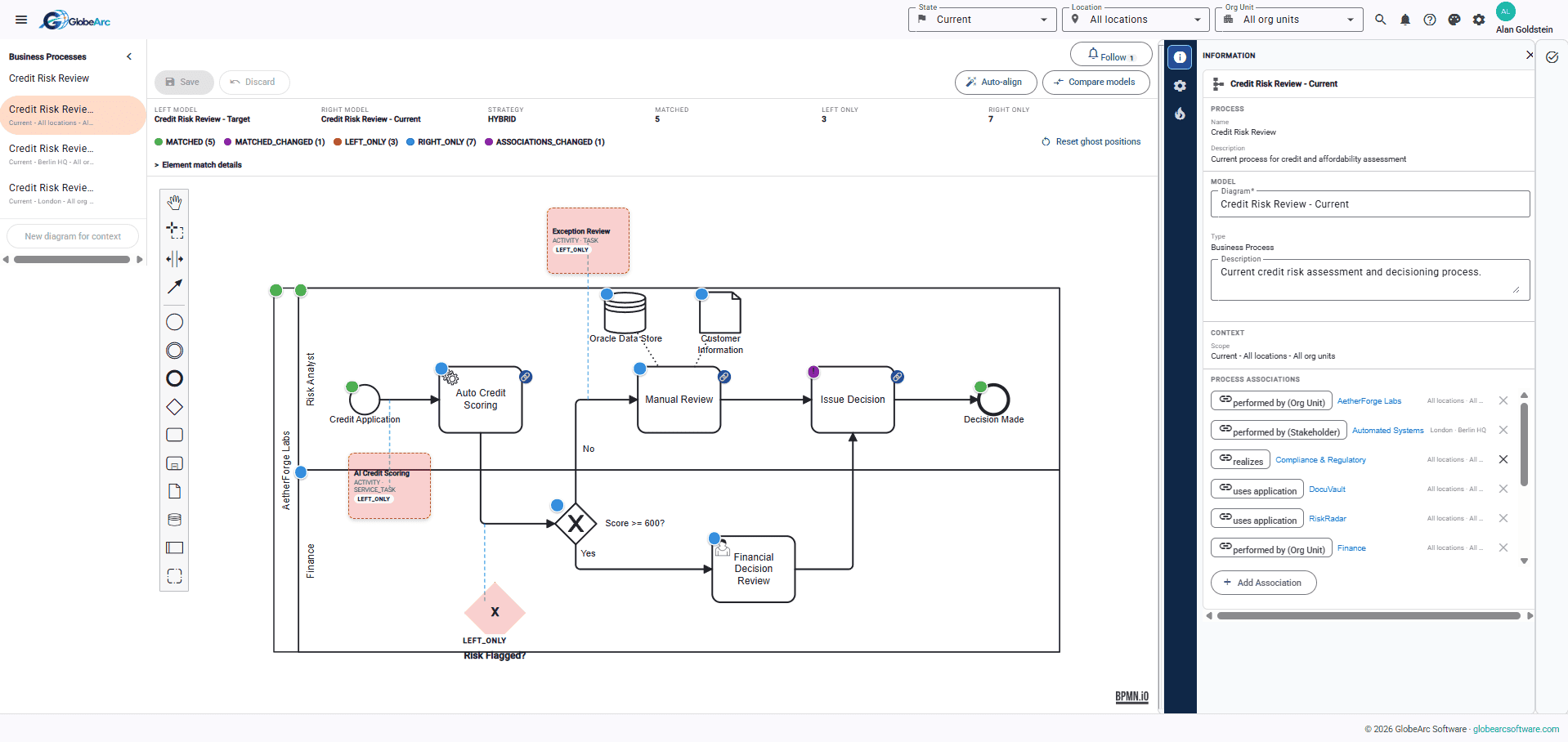
I’ve worked with companies that built out detailed process models, but those models didn’t go down to the actual applications used for each task. The lanes and pools didn’t connect to the actual departments or stakeholders performing the work.
It works the other way too. When the technology team looks at an application, they don’t see its connection to the processes. They may know which servers it runs on, and even which locations, regions, or departments use it. What they don’t know is where it’s tied to customer-facing processes or to strategic importance. Some of the highest-level strategic goals in a company can drill all the way down to the money being spent on specific applications. Without that connection, there’s no way to have accurate information about how applications are used in your business processes.
Even the names are often different. The business may know an application by one name based on how they use it, while the technology side knows it by what it’s really called.
Connect Enterprise Architecture With Business Processes
See how GlobeArc connects applications, business capabilities, and processes in one environment, making it easier to understand dependencies and assess the impact of application rationalization decisions.
Explore GlobeArc's Capabilities
Why Mentioning an Application in a Process Model Doesn't Establish a Connection
Simply mentioning an application within a business process does not establish a formal connection between the process and the application.
For example, a business process may reference “Oracle” within a task description, indicating that the task depends on the application. While this relationship is clear to someone reviewing the process, it remains disconnected from the underlying Enterprise Architecture data. As a result, when IT teams use their Enterprise Architecture tools to identify processes associated with Oracle, that particular business process will not appear in the results.
To support accurate impact analysis, applications and business processes must be formally connected, allowing organizations to retrieve information from both the business and technology perspectives rather than viewing each in isolation.
How to Start Mapping Application Dependencies Without Connected Tools
The first step is to find out where this information is stored in your company today:
- Where is the official list of organizations?
- Where is the official list of all applications?
- Where are the company’s processes housed?
Make sure you know all the locations and have the full set of information before you start trying to associate everything together.
Common Application Rationalization Mistakes: Trying to Do Everything at Once
One of the most common mistakes in application rationalization initiatives is attempting to accomplish too much too quickly. Organizations often begin collecting information and establishing relationships between different components without first defining the intended outcome. This approach can leave the team working on the initiative frustrated, and the work ends up taking much longer.
A more structured approach begins with defining the initial metamodel and identifying the information required to support it. Once the necessary components are established, organizations should determine where that information resides within the business before mapping the relationships between them.
Frequently Asked Questions
What is a redundant application?
A redundant application is a software application that overlaps with another application in supporting the same business or technical capability. However, shared functionality does not automatically indicate redundancy. Factors such as geographic location, organizational unit requirements, regulatory obligations, and business process dependencies must be evaluated to determine whether an application can be consolidated or retired.
How do you decide which redundant application to keep?
Score each application on business value and technical fit, plot the results on an Application Value Chart, and review them alongside TCO and lifecycle status. Then check the processes, people, and customer-facing work each application supports before making a final decision.
What properties should you score applications on?
For business value: functional fit, business criticality, strategic alignment, and capability criticality. For technical fit: architectural alignment, technology lifecycle, security maturity score, and reliability. Each one should have a clear definition and its own weight.
How often should application scores be reviewed?
Application scores should be reviewed regularly, for example, every six months, to reflect changes in business priorities and the organization's technology landscape. Periodic reassessment helps ensure that application evaluations remain aligned with current business needs and technology requirements.
Why do business processes matter in application rationalization?
Business processes reveal how applications are used, who is responsible for specific activities, and how application data supports decision-making. Understanding these dependencies helps organizations assess the potential impact of application retirement or changes to supporting personnel, particularly on critical operations and customer-facing processes.
How GlobeArc Connects Applications, Business Capabilities, and Processes
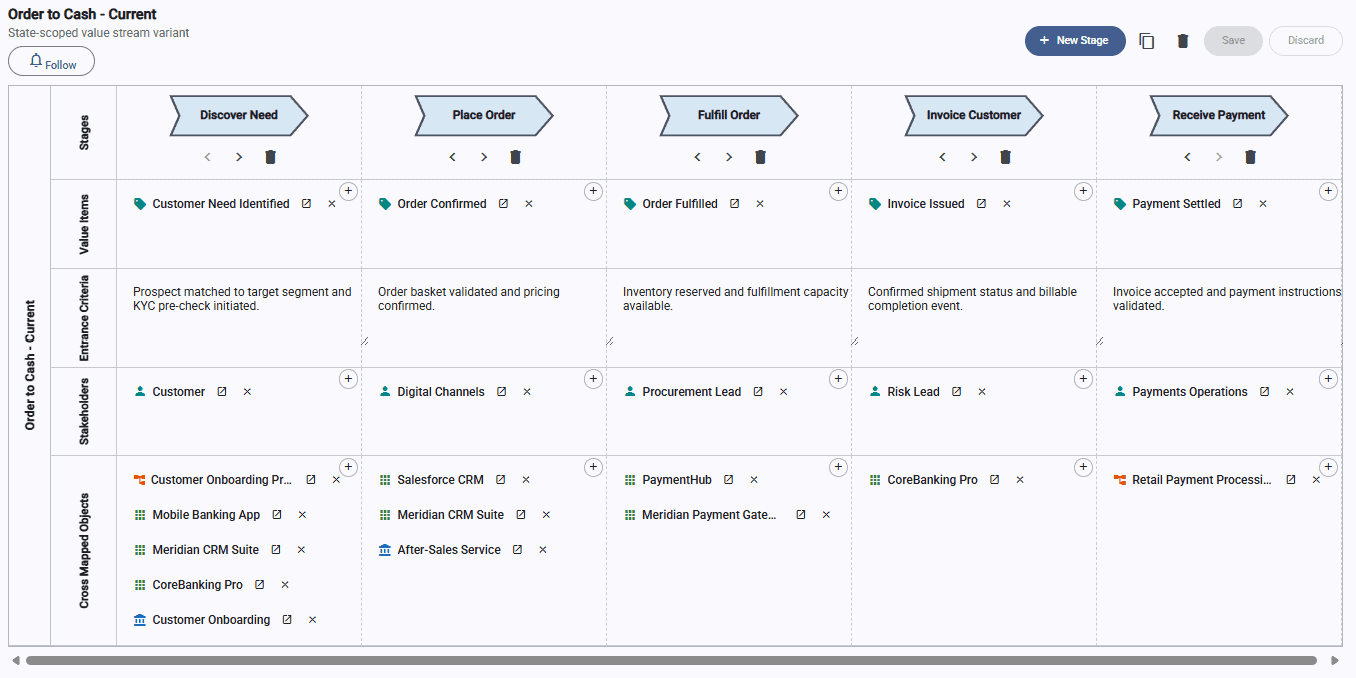
GlobeArc stores all of this in the same database. You can build a process model, attach the applications used in each task, and drill into each application’s properties right from the process model, or drill up to the value stream to see how everything connects. Applications are related to business capabilities and business processes, and the lanes and pools in each process are tied to stakeholders, Org Units, and locations.
The Relationship Explorer lets you see all of those associations. A business capability model heat map shows how many applications are tied to each capability. The application rationalization use case report takes the property scores and plots each application on an Application Value Chart as Tolerate, Invest, Migrate, or Eliminate.
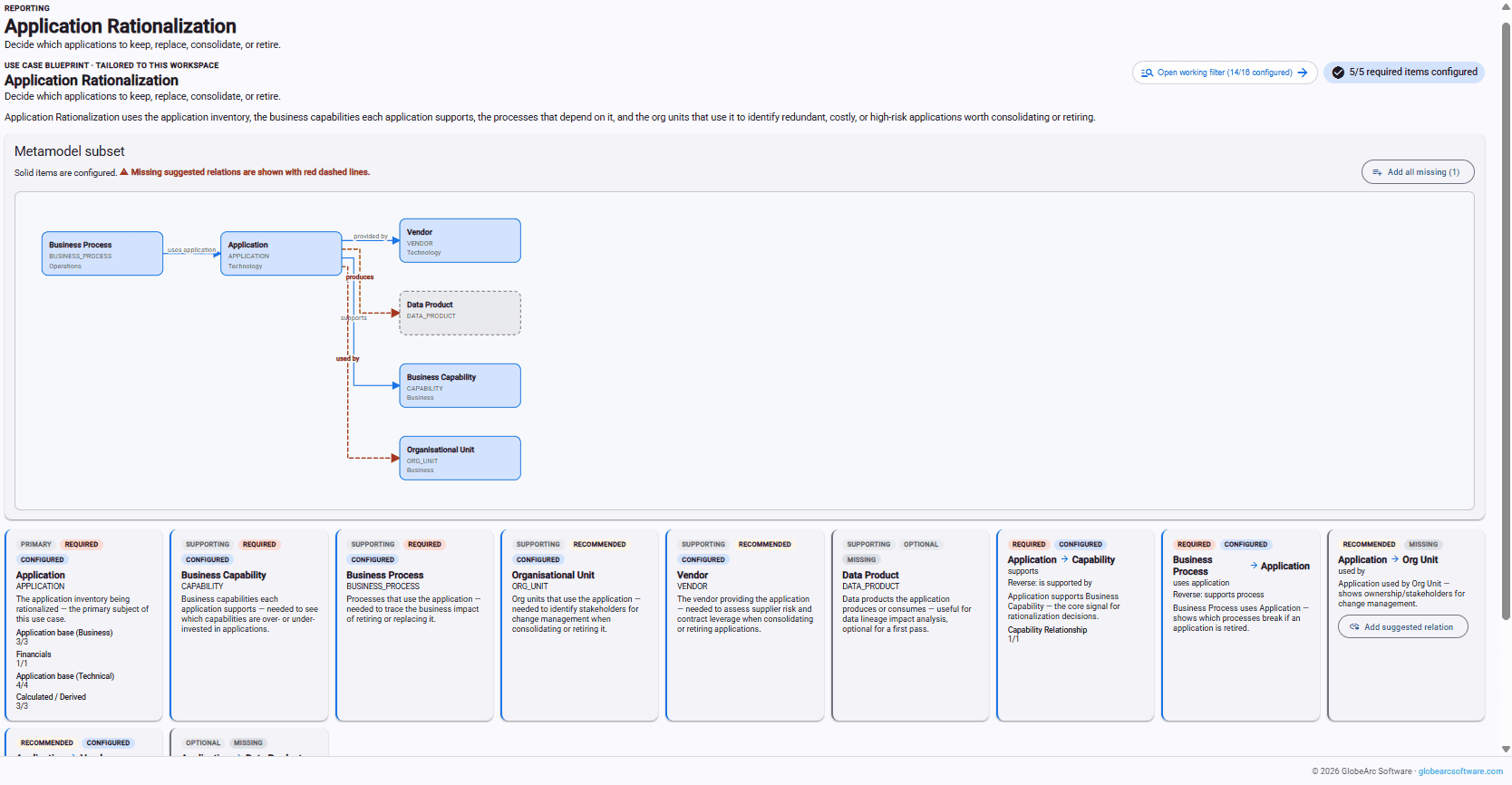
To get you started, the application rationalization blueprint tells you which object types, properties, and associations you need: an application is used by a business process, provided by a vendor, supports a business capability, and is used by an Org Unit. You get a starting point to reach value faster, plus the flexibility to adjust the configuration and add more information as your organization needs it. To see how it works, schedule a GlobeArc demo.
See How Your Applications Connect to Business Processes
Identifying redundant applications is only part of application rationalization. Understanding how those applications connect to business capabilities, processes, organizational units, and vendors is essential for making informed decisions.
GlobeArc brings these relationships together, helping organizations visualize application dependencies, evaluate application value, and identify candidates for consolidation, migration, or retirement.