Process Owners and Process Managers
Process Management
Business Process Modeling Software for Connected, Current Processes
Business process modeling software should help process leaders do more than document workflows.
GlobeArc gives process teams a practical way to capture, model, compare, and manage processes while connecting them to the people, applications, data, capabilities, and value streams involved in getting work done.
Because process models use the same underlying repository as the wider enterprise model, BPMN diagrams do not have to sit apart from business and technology information.
Process leaders can see how work operates today, understand what supports each step, and evaluate what needs to change without maintaining another disconnected set of diagrams.

What is Business Process Modeling Software?
Business process modeling software helps teams document, visualize, analyze, and maintain how work moves through an organization. GlobeArc supports native BPMN modeling while connecting process information to the wider business context around it.
For teams evaluating business process management software or BPMN software, that connection makes it possible to investigate more than the flow itself. Process leaders can also understand ownership, supporting systems, organizational involvement, and how processes contribute to broader business capabilities and value streams.
How Do You Document Business Processes?
Effective process documentation starts by capturing how work is actually performed and turning that knowledge into a model people can review and maintain. GlobeArc supports several ways to get a process onto the canvas, depending on what already exists.
Process teams can:
- Build a BPMN model directly in GlobeArc
- Import an existing standard BPMN file
- Generate a first-draft BPMN model from a plain-English description
- Connect process activities to existing enterprise information
- Associate process lanes with real organizational records
- Import existing Visio process diagrams and convert them to BPMN
This gives teams more flexibility than requiring every process to begin with a blank modeling canvas.

What is BPMN, and How Does GlobeArc Use it?
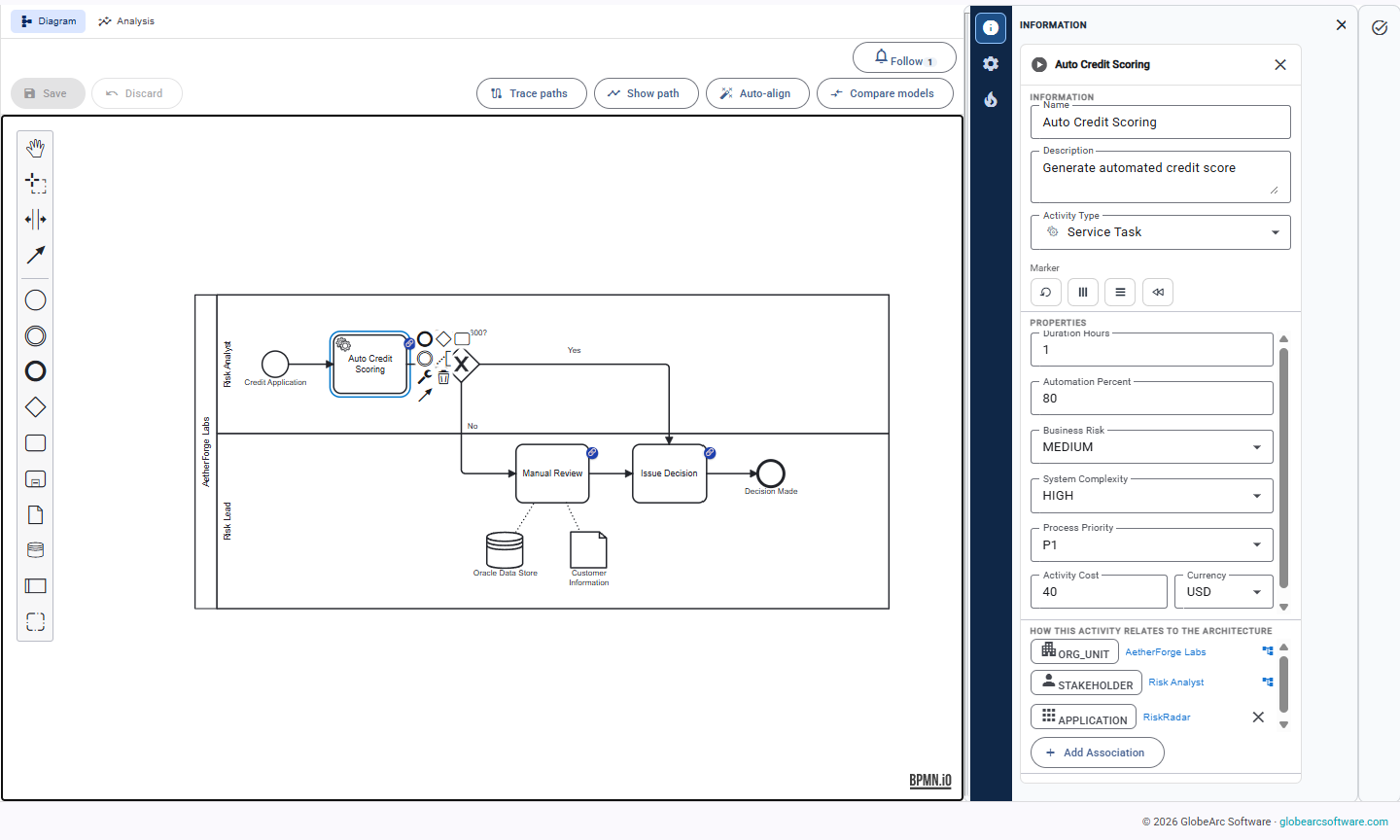
BPMN provides a standardized way to represent business processes, including activities, decisions, events, participants, and process flow.
GlobeArc uses a native BPMN modeling environment rather than treating process diagrams as uploaded images or separate documentation.
Lanes can resolve to actual stakeholders, organizational units, or locations, while activities can connect to applications and other repository objects.
The process model therefore becomes part of the enterprise information model rather than a diagram that has to be cross-referenced manually.
Can You Import Existing BPMN Models?
Existing BPMN models can be brought into GlobeArc rather than recreated from scratch. This gives process teams a practical starting point when they already have a process-modeling estate in another BPMN-compatible tool.
Imported models pass through GlobeArc's validation before they are persisted, helping teams move existing process documentation into the platform while keeping the resulting models connected to the same environment used for ongoing process work.

Can AI Generate BPMN Diagrams?
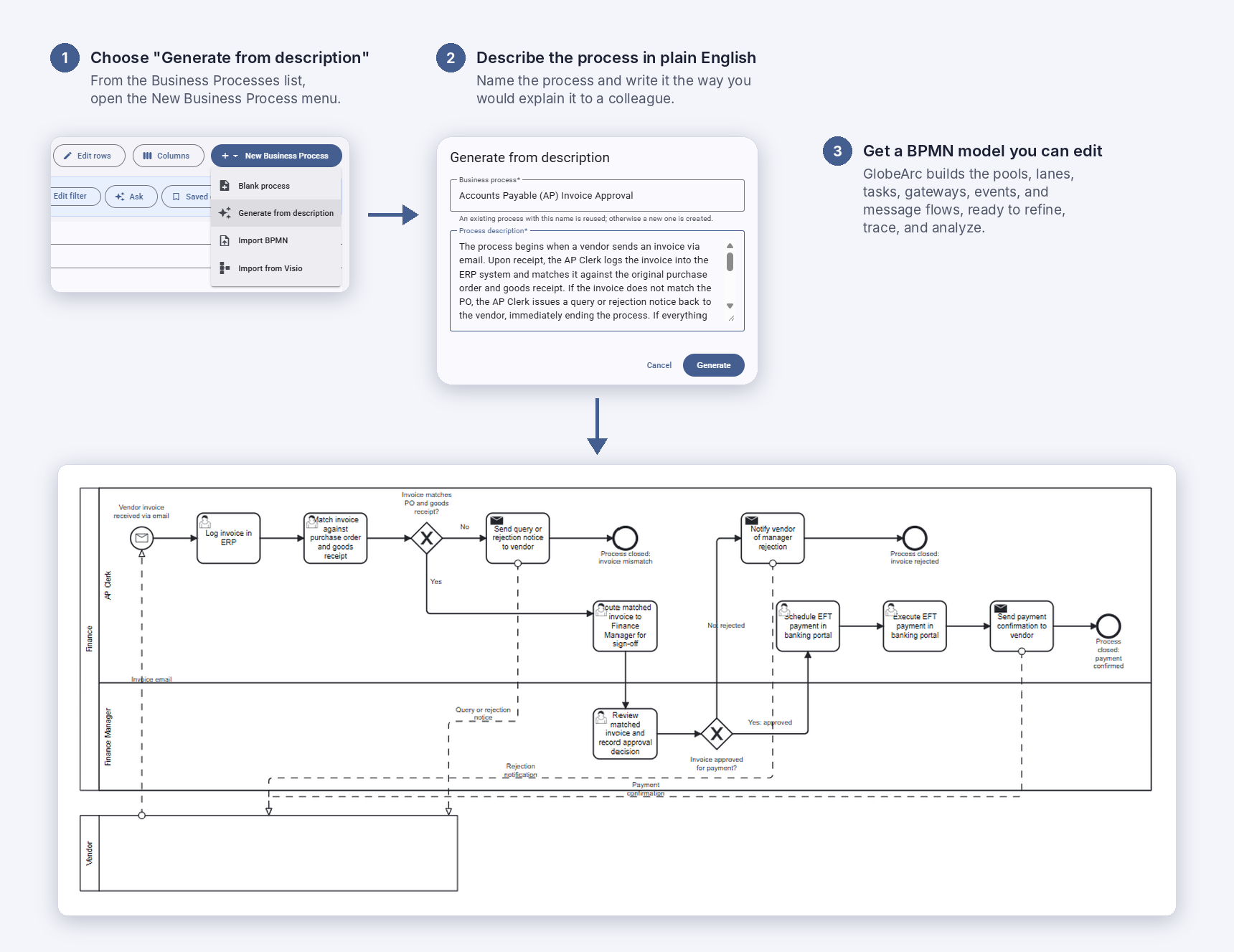
AI can create a reviewable first draft of a BPMN model from a plain-language process description.
A process leader or analyst can describe the flow, review the generated diagram on the BPMN canvas, make corrections, and then decide whether to save it.
The generated model goes through the same structural and semantic validation used for BPMN imports before it is persisted. Inside GlobeArc, choose "Generate from description" from the New Business Process menu.
This makes AI BPMN generation a faster starting point for process capture without treating the generated result as a finished process model that requires no human review.
How Do You Keep Hundreds of Process Models Current?
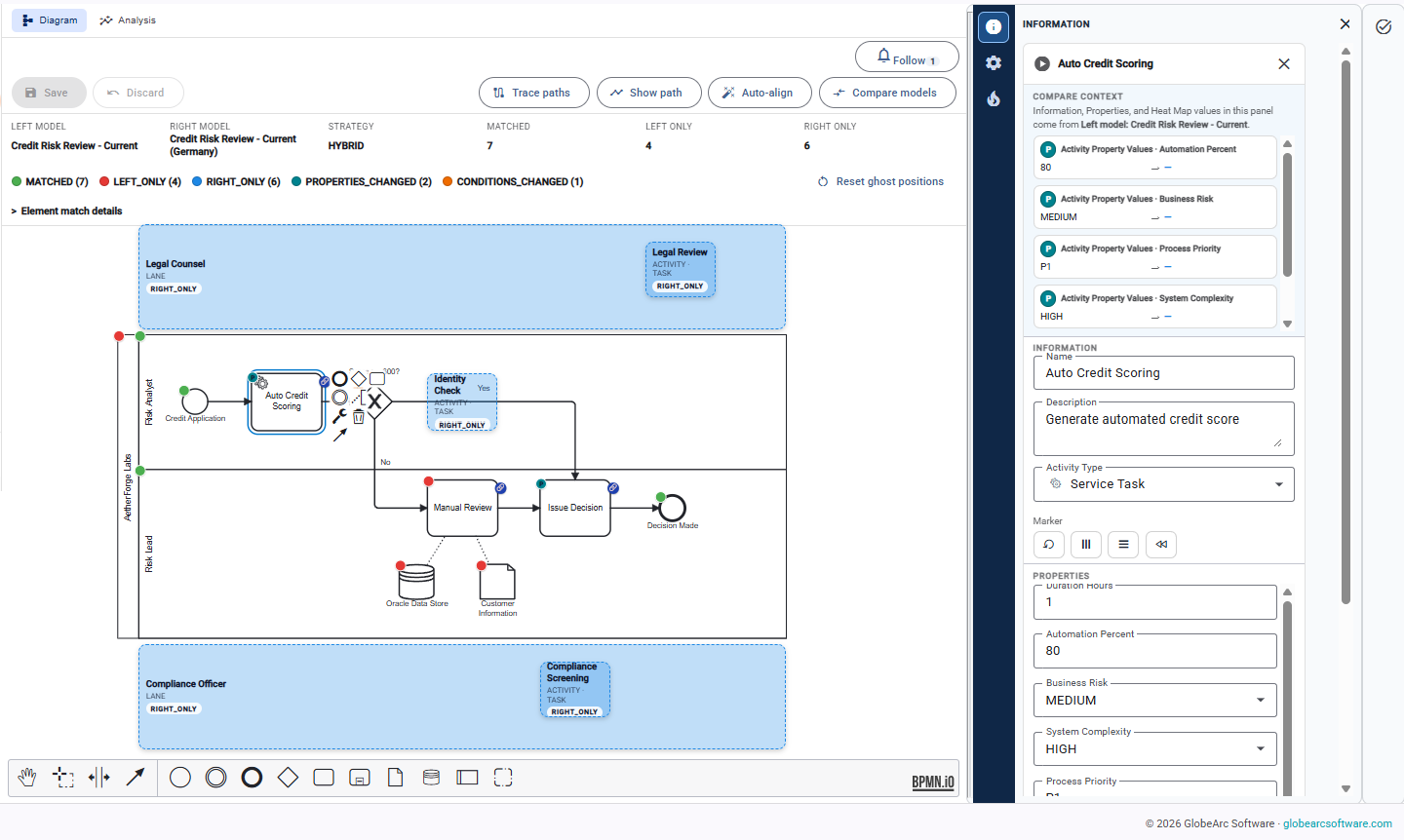
Maintaining a large process portfolio becomes easier when teams can focus on what changed instead of repeatedly reviewing entire models. GlobeArc supports cross-context process comparison so teams can see matched, renamed, changed, added, and removed process elements.
Processes can also exist within different State, Location, and Org Unit contexts. That helps process leaders manage legitimate variations such as:
- Current and proposed processes
- Different locations implementations
- Organizational unit variations
- Interim processes during transformation
- Target operating models
This reduces the need to maintain unrelated copies of essentially the same process.

How Can Process Owners Test a Change Before Making it?
GlobeArc can simulate BPMN process models using the people, headcount, and availability already connected to them. Trace mode follows work step by step to show where it slows down or waits, and the Process Analysis view compares Current and Target variants side by side on cost, duration, waiting time, and team capacity. Process owners can see the expected effect of a change before committing to it.

How Do Business Processes Connect to Value Streams?
Processes show how work is performed, while value streams show how value moves toward an outcome. Connecting the two helps process leaders understand where individual processes contribute to a broader customer or business result.
GlobeArc keeps process models and value streams within the same enterprise foundation, making it easier to trace relationships between operational work, capabilities, stakeholders, and value delivery.

How Can Process Leaders Improve Standardization and Governance?
Standardization becomes easier when process teams work from a common repository and can compare variations instead of maintaining disconnected files. GlobeArc gives process leaders clearer visibility into process ownership, organizational context, related systems, and differences between Current and proposed models.
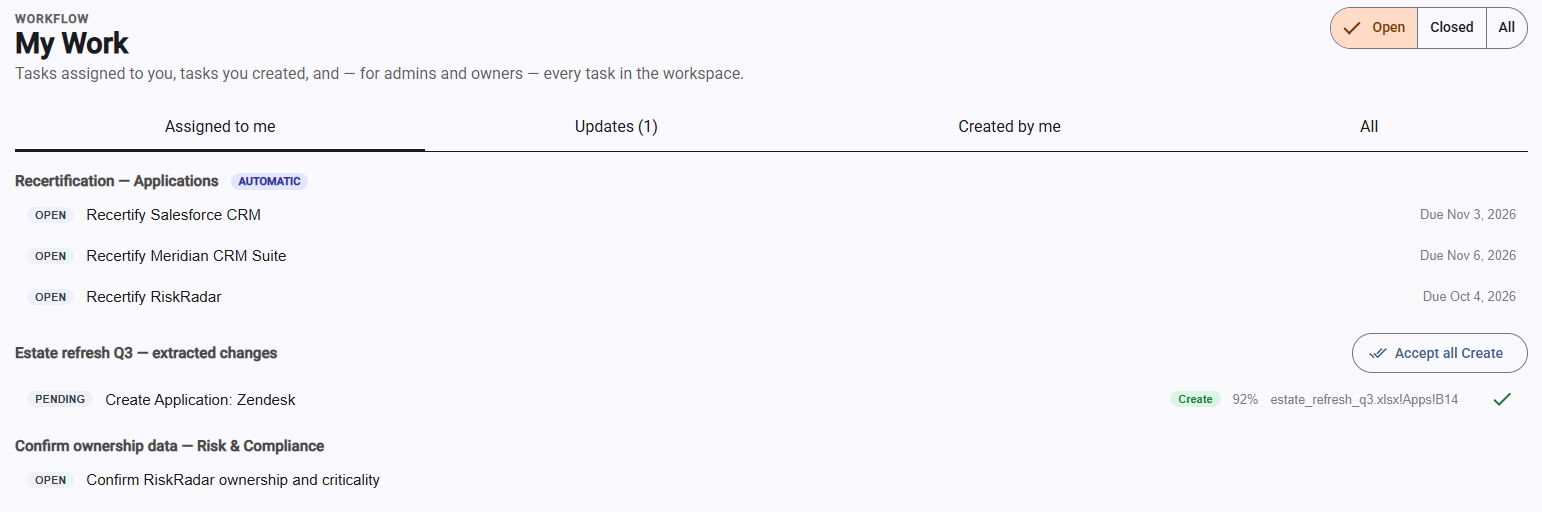
Workflow automations can also handle recurring governance work, such as periodic process recertification, with tasks appearing in each owner’s My Work view.

Connect Processes to People, Systems, and Data
A process becomes more useful when the diagram reflects the real enterprise around it. GlobeArc lets process elements connect to repository information so teams can understand more than the sequence of activities.
Process leaders can investigate:
- Which teams or stakeholders perform particular work
- Which applications support individual activities
- What organizational areas participate in a process
- Which enterprise objects are connected to particular steps
- Where the same process appears in different business contexts
Because these relationships use the same repository as the rest of GlobeArc, process information can contribute to broader business and technology analysis rather than remaining inside the BPMN model.
How Can Process Leaders Identify Process Exposure?
Process exposure becomes easier to understand when risk, cost, criticality, or other business information can be viewed directly against the process. GlobeArc's shared heat-map engine can apply analytical lenses to BPMN models as well as capability maps, value streams, and application landscapes.
This can help process leaders identify areas such as:
- Activities associated with higher risk
- Steps dependent on critical technology
- Areas with concentrated cost
- Potential single points of dependency
- Parts of a process requiring closer investigation
GlobeArc focuses on the structure and dependencies surrounding the process. It isn’t a process mining tool and doesn’t measure live process execution.

Keep Process Documentation Connected to the Business
Process models are harder to trust when they become isolated documentation that gradually drifts away from how the organization actually operates. GlobeArc keeps BPMN processes connected to the people, systems, data, capabilities, organizational structures, and value streams around them.
For business process leaders, that creates a stronger foundation for capturing processes, keeping models current, understanding dependencies, supporting transformation, and maintaining a process portfolio that remains useful after the original modeling workshop is over.
We’re here to help you bring clarity to complexity.