AI-Assisted Process Modeling
AI-Assisted Modeling
AI-Assisted Process Modeling From Plain English to Connected BPMN
Process documentation is often the slowest part of any improvement, transformation, or standardization effort. Workshops produce notes and whiteboard sketches, legacy diagrams sit in Visio files, and turning all of that into consistent, usable process models takes time many teams don't have.
GlobeArc uses AI to speed up that work without giving up control. Teams can describe a process in plain English and receive a BPMN model as a starting point, bring existing Visio diagrams into the repository, ask questions about process information in natural language, and use AI to help compare process models. Every generated model is reviewed and validated before it becomes part of the repository.
How Does GlobeArc Generate a BPMN Model From Plain English?
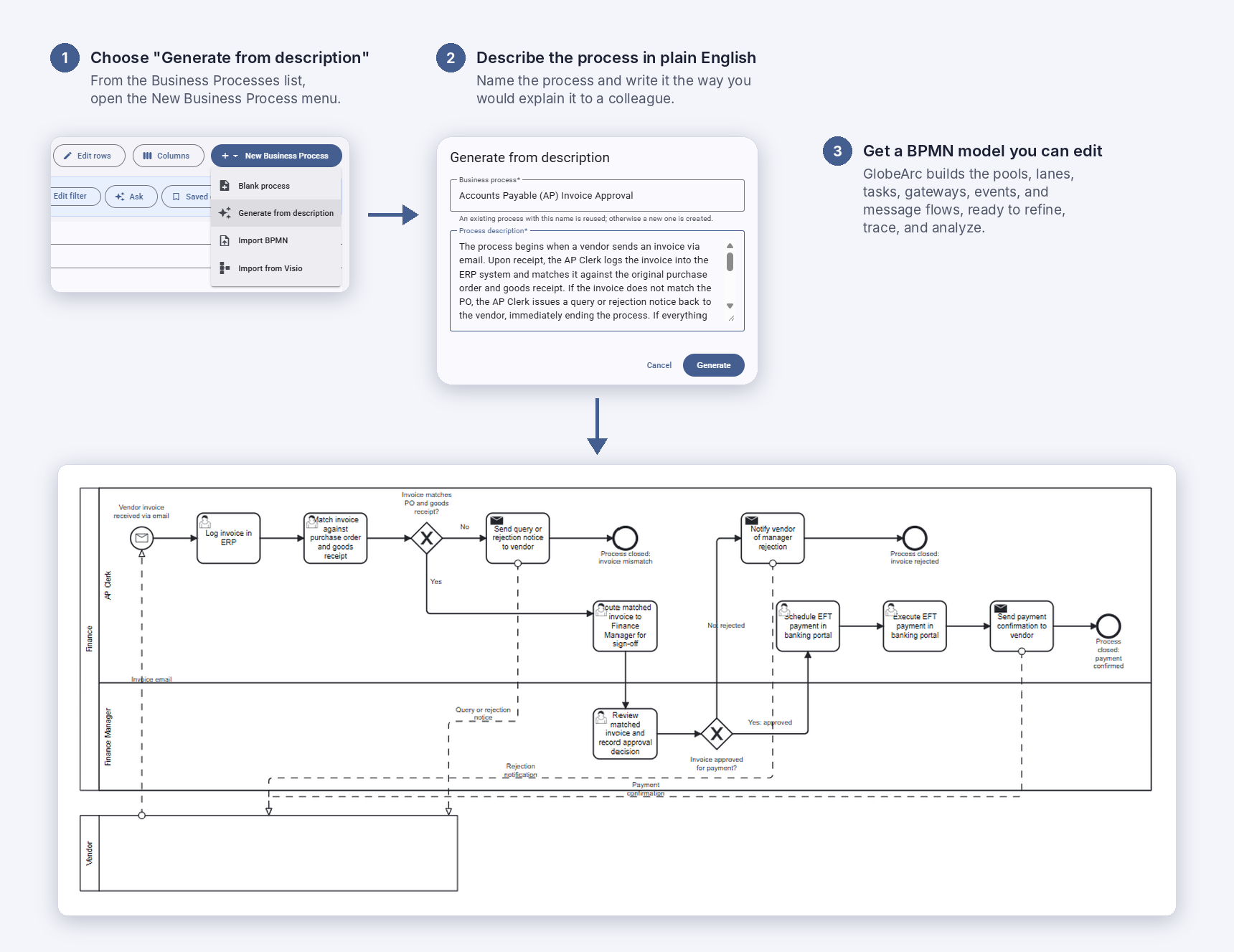
A process owner or analyst describes how the work happens, in their own words. Inside GlobeArc, choose Generate from description from the New Business Process menu, or use a compatible AI assistant such as Claude, Copilot, or Gemini. GlobeArc turns that description into a proposed BPMN process model the team can review and refine, rather than starting every diagram from an empty canvas.
The generated model isn't silently saved as the official process. Users can review, edit, save, or discard it, and the model passes through GlobeArc's process validation before it becomes part of the repository.

Can We Bring Existing Visio Process Diagrams Into GlobeArc?
Yes. Existing Visio diagrams can be imported and converted into BPMN process models in GlobeArc, so years of process documentation doesn't have to be redrawn by hand. Once imported, the process becomes part of the connected repository, where lanes and activities can be linked to real stakeholders, organizational units, locations, and applications. Choose Import from Visio from the New Business Process menu.

How Does AI Help Compare Process Models?
BPMN model comparison in GlobeArc highlights matched, renamed, changed, added, and removed elements between two process versions, whether that's Current versus Target or one location's variant against the global standard. Teams choose the comparison strategy that fits: Deterministic, AI, or Hybrid, which runs the deterministic comparison first and then AI. AI assistance can then help explain what changed and point teams to the differences that deserve a closer look.

How Does GlobeArc Keep AI-Assisted Modeling Safe?
Asking a question and changing a process model carry different levels of risk, so GlobeArc keeps them on separately permissioned pathways. Querying is read-only. Creating a process model uses a narrower, process-specific permission, and every generated model is validated before it is saved. The Secure Enterprise AI page explains these controls in more detail.

Why Does AI-Assisted Modeling Matter More in a Connected Platform?
A generated diagram on its own is just a picture. In GlobeArc, the process model connects to the same applications, capabilities, organizational units, and stakeholders used across the rest of the platform, so a model created in minutes can immediately support impact analysis, process standardization, application rationalization, and Target-State planning.
How Can Teams Ask Questions About Process Information in Plain English?
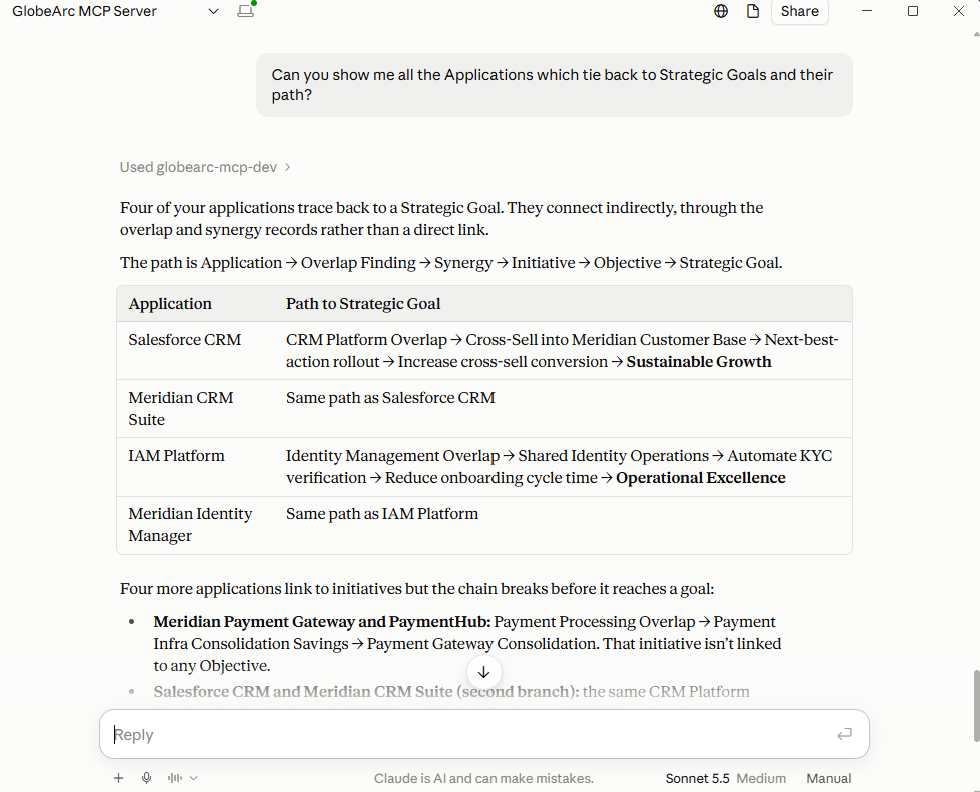
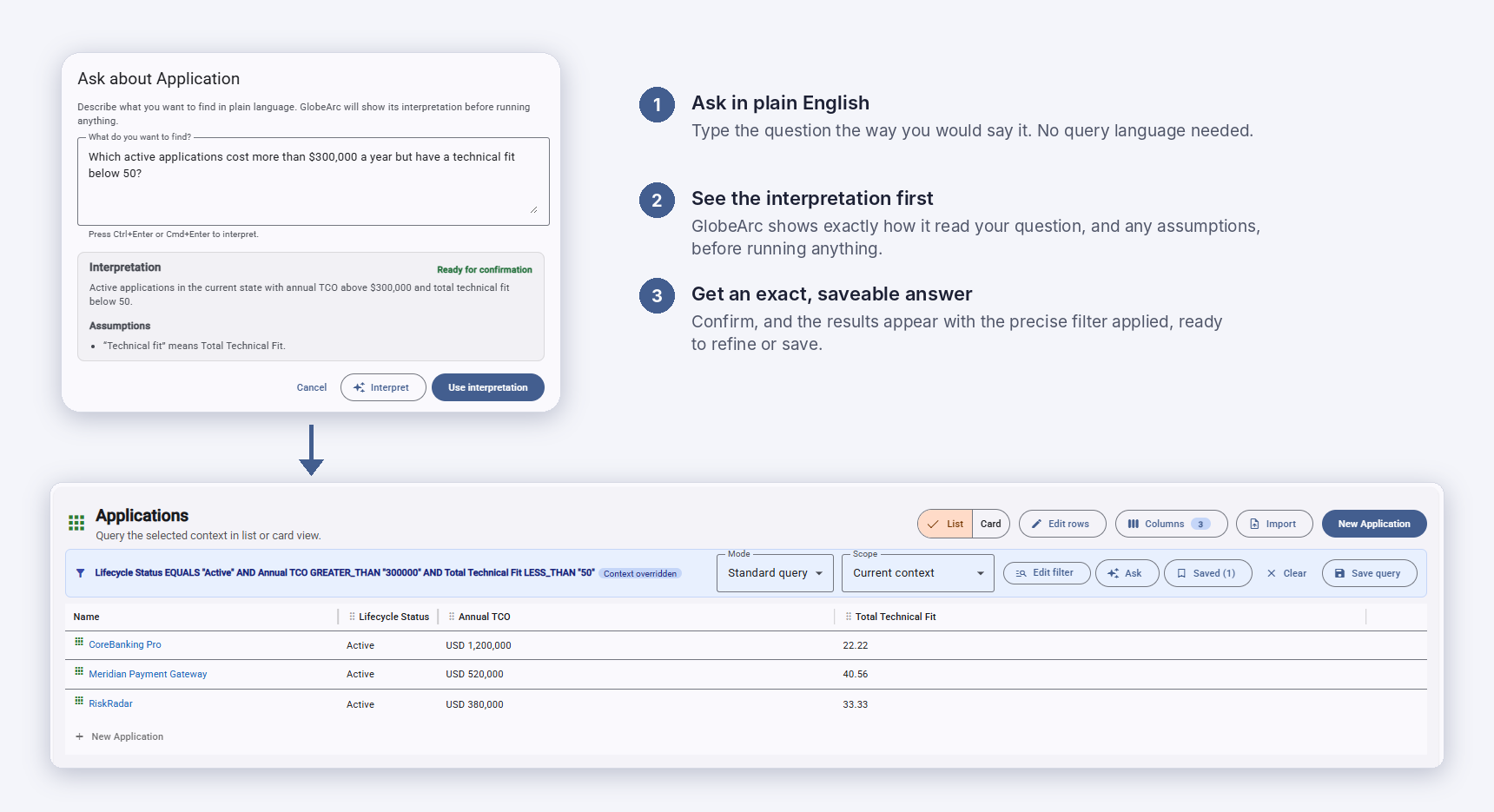
Through GlobeArc's MCP connection, compatible AI assistants can answer questions using the process and architecture information inside a GlobeArc workspace. Instead of learning the metamodel or building a query, users can start with the business question.
Examples include:
- Which processes use this application?
- Which organizational units perform this process?
- Where does this stakeholder appear across our process models?
- Which processes support this business capability?
- What changes between the Current and Target version of this process?
These queries are read-only and pass through GlobeArc's validated query structure, so the AI assistant never receives direct database access. Users can also ask the same questions with the Ask feature inside GlobeArc.
What Other EA and BPM Solutions Support AI-Assisted Process Modeling?
AI-assisted process modeling supports broader process improvement and enterprise architecture initiatives by making process information easier to capture, connect, and analyze. These models can then support process standardization, application rationalization, and Target-State planning without requiring teams to recreate the same information across separate tools.
Related solutions include:
- Transformation and Target-State Planning
- Application Modernization and Landscape Management
- Application Rationalization
- Mergers and Acquisitions Integration
- Strategy to Execution
- Process Standardization Across Locations and Organizational Units
What AI-Assisted Modeling Doesn't Replace
GlobeArc doesn’t run your business processes. Its role is to help teams capture, connect, and understand their processes faster.
Who Uses GlobeArc for AI-Assisted Process Modeling?
Business and Process Analysts use AI-assisted modeling to capture processes quickly from workshops, interviews, and existing documentation. Process Owners and Process Managers review and approve the resulting models and use plain-English questions to understand how their processes connect to the wider organization.
Business Architects and Enterprise Architects benefit from process information that is connected to the rest of the architecture from the start.
See AI-Assisted Process Modeling in GlobeArc
Request a demo to describe a process in plain English, watch it become a connected BPMN model, and ask questions about your process information with the built-in Ask feature or through a compatible AI assistant.
We’re here to help you bring clarity to complexity.