One Connected View
One Connected View
One Connected View Across Enterprise Architecture and Business Process Management
An enterprise architecture repository becomes more useful when it connects not only applications, capabilities, technology, and strategy, but also the processes that show how work actually happens. GlobeArc brings Enterprise Architecture and Business Process Management into one configurable repository, connecting strategy, processes, capabilities, applications, technology, data, people, and organizational context through the same underlying information.
The same records can be reused across BPMN process models, capability maps, value streams, application landscapes, reports, queries, heat maps, and planning views. Instead of creating another copy whenever information appears somewhere new, GlobeArc keeps architecture and process information connected, giving teams one consistent foundation for understanding dependencies, planning change, and seeing how the enterprise operates.


What is an Enterprise Architecture Repository?
An enterprise architecture repository is the structured foundation for the objects, relationships, and information used to describe an organization. Rather than keeping business and technology architecture in separate silos, a connected repository brings the information together and preserves the relationships between it.
Depending on the organization's metamodel, the repository can include:
- Applications and supporting technology
- Business capabilities
- Business processes
- Value streams
- Value stream stages
- Organizational units
- Stakeholders
- Strategic goals, objectives, and initiatives
- Projects
- Information concepts
- Locations and other organizational context
The value of an architecture repository isn't simply having everything in one database. The information needs to be connected in ways that reflect the organization itself. Applications support capabilities, organizational units perform capabilities, stakeholders participate in value streams, and initiatives realize capabilities. GlobeArc maintains these connections so architecture becomes a navigable body of knowledge rather than a collection of isolated records.
Enterprise Metamodel
How Does GlobeArc's Enterprise Metamodel Work?
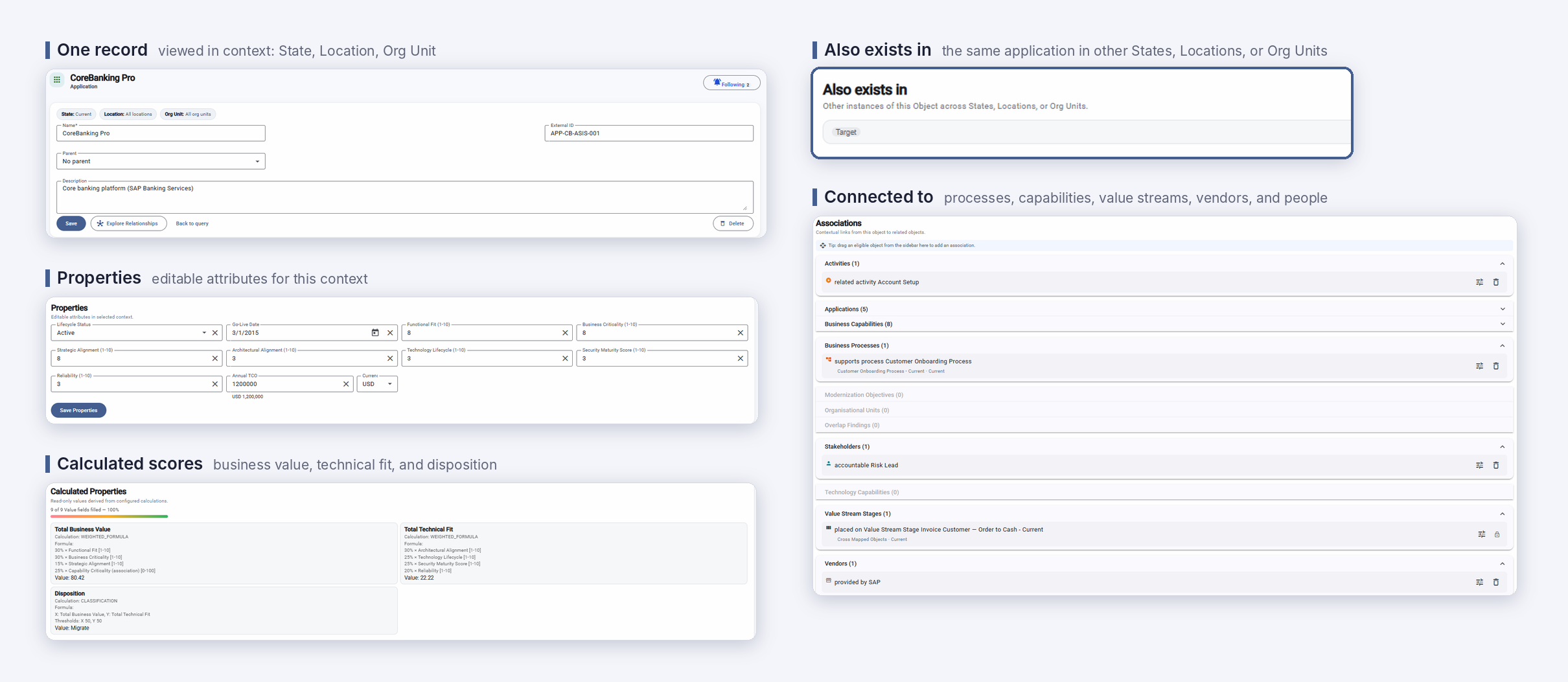
GlobeArc structures its enterprise metamodel around Objects, Associations, and Properties. This provides enough structure to connect information consistently while allowing organizations to configure the metamodel around their own architecture needs. Together, Objects, Associations, and Properties create a configurable enterprise metamodel that can evolve with the organization's needs without requiring every team to maintain its own architecture structure.
Objects
Objects represent the things an organization needs to understand. These can include applications, capabilities, processes, value stream stages, stakeholders, organizational units, initiatives, and other business or technology elements.

Associations
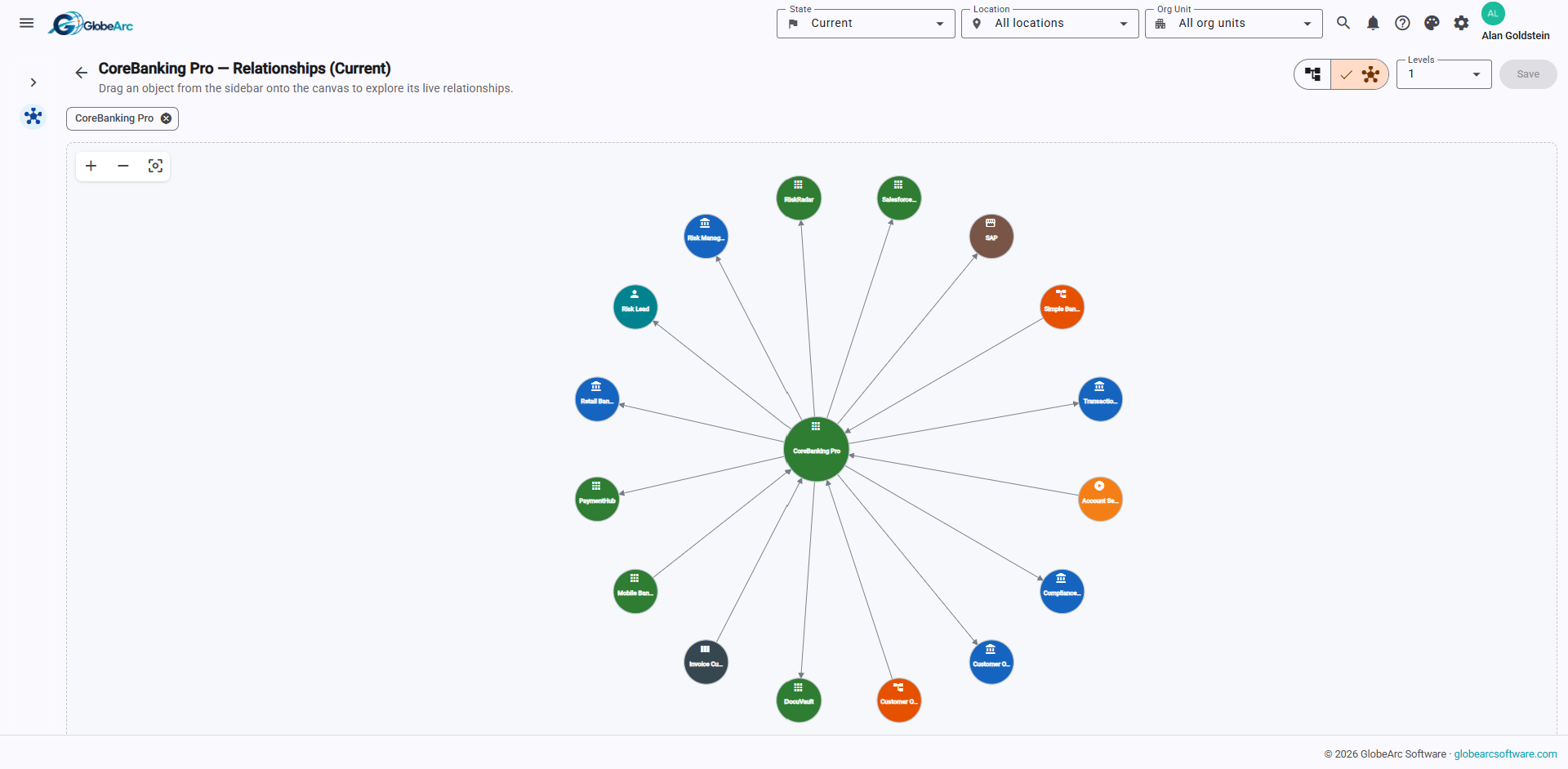
Associations describe how objects relate to one another. An application can support a capability, an organizational unit can perform a capability, or an initiative can realize a capability. These explicit connections allow teams to trace dependencies across different architecture domains instead of relying on names, spreadsheets, or manually maintained cross-references.

Properties
Properties capture information about objects and relationships. They can describe characteristics used for analysis, reporting, classification, and decision-making, while calculated properties can derive additional values from repository data.
How Does GlobeArc Connect Strategy, Process, Technology, Data, and People?
Enterprise decisions rarely stay inside one architecture domain. Retiring an application can affect a process, a capability can depend on several applications, a value stream can cross organizational boundaries, and a strategic initiative can require changes across both business and technology.
GlobeArc brings these domains together through shared records and explicit relationships. Teams can follow those connections to understand how strategy, processes, applications, capabilities, information, stakeholders, and organizational structures influence one another, without rebuilding the context for each new question.
How Does One Configurable Repository Reduce Duplicate Information?
GlobeArc uses one canonical enterprise repository as the source for its visual models, reports, heat maps, queries, and other views. If the same application appears in an application landscape, capability map, report, or related process context, those views can draw from the same underlying record rather than maintaining independent copies.
That reduces the duplication that causes architecture information to drift over time. It also means a model isn't simply a static picture of the repository at the moment someone created it. Different views can draw from the same connected enterprise data and present it in the context needed for a particular decision.
How Do Dynamic Contexts Support Enterprise Change?
Enterprise architecture isn't identical everywhere, and it doesn't remain static over time. GlobeArc uses State, Location, and Org Unit as structural planning contexts, allowing teams to understand architecture information in the context where it applies.
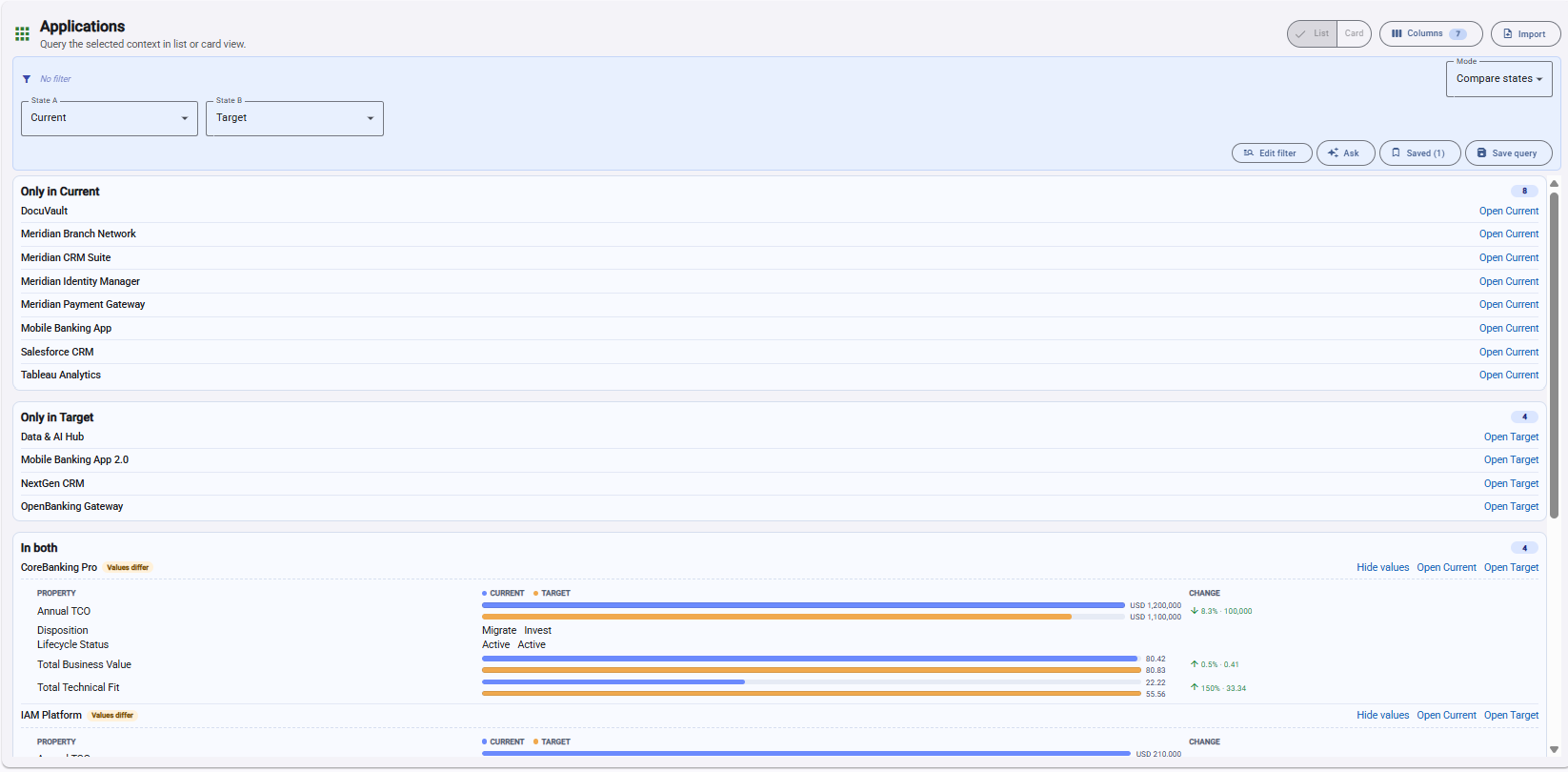
State can represent Current, Interim, and Target architecture. Location and Org Unit can represent geographic and organizational differences, including hierarchical rollups and explicit exceptions. Teams can therefore examine the same connected architecture from different planning perspectives without creating a separate repository for each variation.
Compare Current, Interim, and Target States
GlobeArc can compare states to identify differences between the architecture that exists today and the architecture an organization intends to create. Comparisons can show structural differences as well as directional property changes, helping teams see what has been added, removed, or changed.
This makes Current and Target states part of the underlying architecture context rather than disconnected diagrams that need to be reconciled manually.

Connected Architecture Data
How Can Teams Visualize Connected Architecture Data?
Different questions need different visual perspectives. GlobeArc's visual modeling suite draws from the connected repository, allowing teams to use the same underlying enterprise information across:
- BPMN process models
- Business capability maps
- Value stream models
- Application landscape models
Each visual model provides a different perspective, but it doesn't require another independent source of architecture information.
Native BPMN Process Modeling
GlobeArc supports native BPMN process modeling using repository-connected enterprise information. Process lanes can resolve to stakeholders, organizational units, and locations, while activities can link to other repository objects. The model can also derive relevant associations from those connections, making a process part of the broader architecture rather than an isolated diagram.
Business Capability Maps
Business capability maps provide a structured view of what the organization needs to be able to do. Because capabilities share the same repository with applications, organizational units, information concepts, value streams, and other objects, teams can explore what supports a capability and where dependencies exist.
Value Stream Modeling
Value streams help teams understand how value moves through the organization. GlobeArc connects value stream stages to the same capabilities, stakeholders, and other enterprise information used elsewhere in the platform, helping business architecture remain connected across different views.
Application Landscape Models
Application landscape models generate views of the application estate from repository information. Teams can organize applications using supported grouping dimensions, examine them in business context, and use the same underlying records that support application analysis elsewhere in GlobeArc.
Analysis
How Does GlobeArc Turn Repository Data Into Analysis?

Heat Maps Across Multiple Architecture Views
GlobeArc uses a shared heat-map engine across business capability maps, value streams, BPMN process models, and application landscapes. Teams can apply analytical lenses to different visual contexts without learning a separate analytics mechanism for every model type. Teams can start from a shared saved recipe, such as Application Count Exposure or Capability TCO Exposure, use the Heat Map Wizard to build one step by step, or create their own from scratch by choosing the properties, color buckets, and thresholds that matter to the question.
This makes it easier to move between questions while keeping the underlying analysis connected to the same enterprise information.

Calculated Properties and Value Scoring
Calculated properties can derive values using functions such as sums, averages, weighted formulas, and classifications. These capabilities also support transparent application value scoring, where teams can work with criteria such as Business Value and Technical Fit rather than relying on an unexplained score.
How Does GlobeArc Simulate and Analyze Processes?
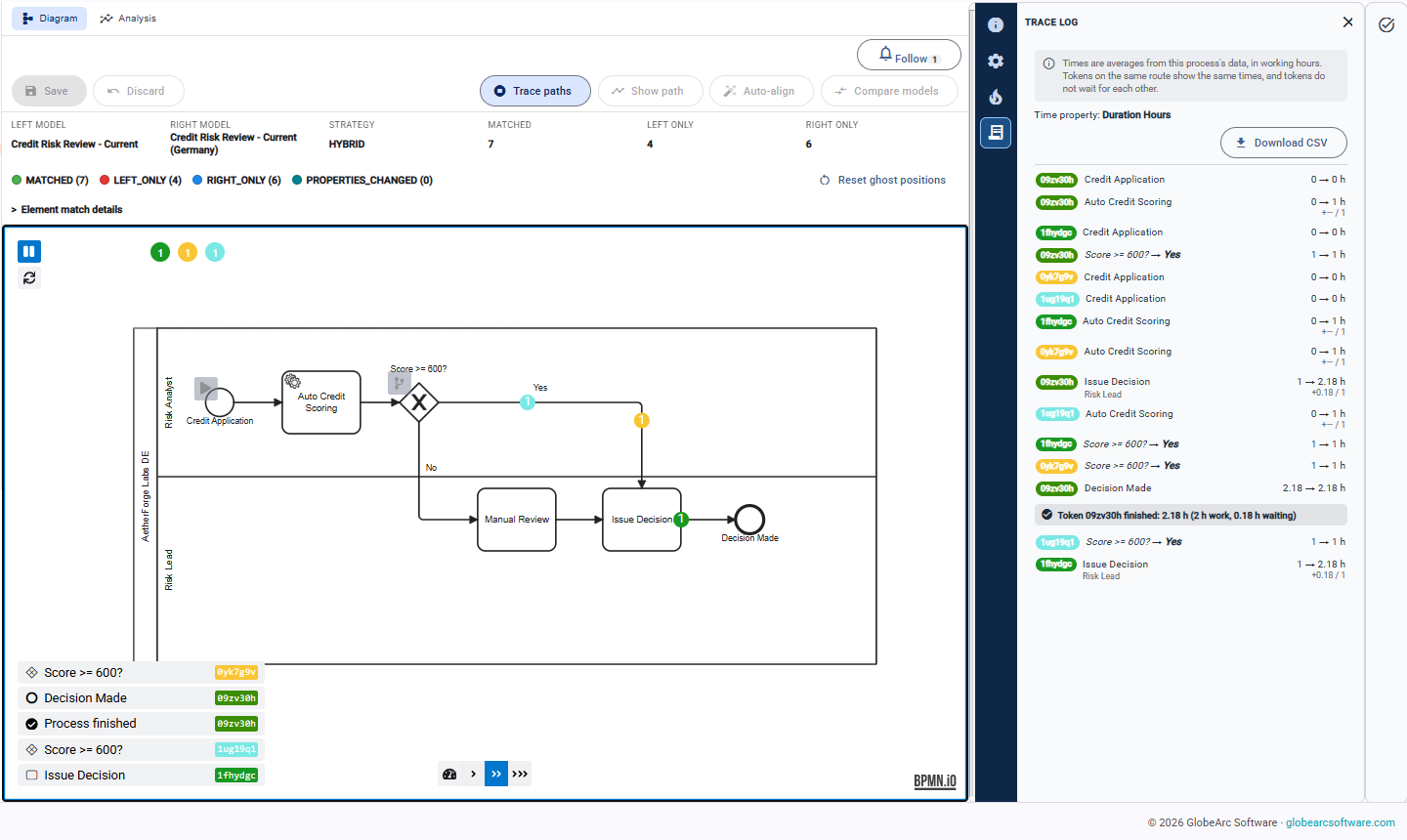
BPMN process models in GlobeArc can be simulated, not just drawn. Process simulation uses the information already connected to the model, including the stakeholders who perform the work and their headcount and weekly availability. Trace mode lets teams follow work step by step to see where it slows down or waits.
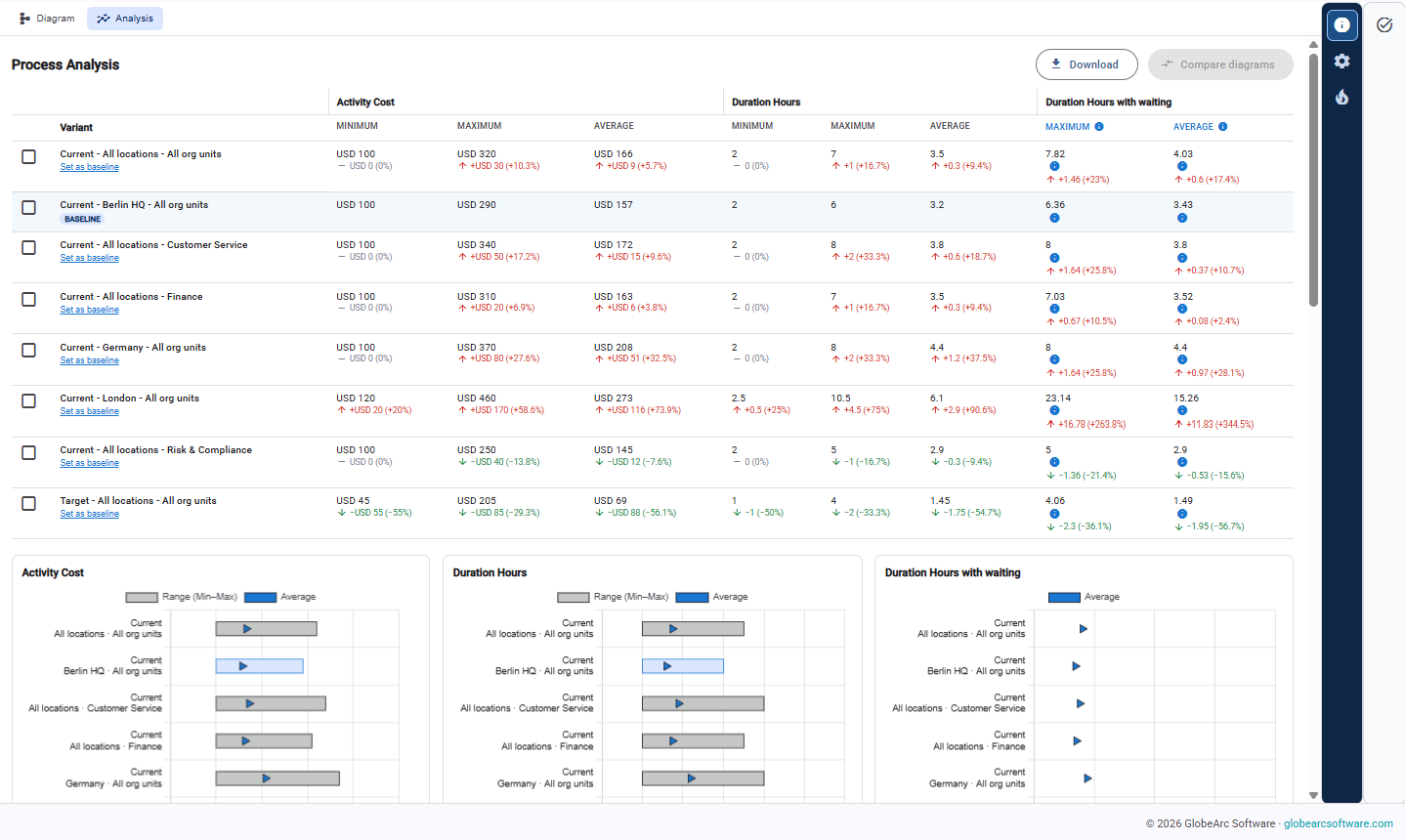
The Process Analysis view compares Current and Target variants of a process side by side on cost, duration, waiting time, and team capacity, so teams can see the expected effect of a change before committing to it. Because the process connects to the same applications, organizational units, and stakeholders used across the repository, the results stay tied to the wider enterprise rather than sitting in a separate simulation tool.

How Does Guided Reporting Turn Architecture Data Into Answers?
Architecture repositories can become difficult to use when people need to understand the metamodel before answering a business question. GlobeArc's guided reporting and exploration capabilities make connected information easier to find and apply through tools such as:
- Use Case Blueprints that identify the information required for a specific business question
- Metamodel Explorer for understanding available architecture structures
- Saved queries for repeatable analysis
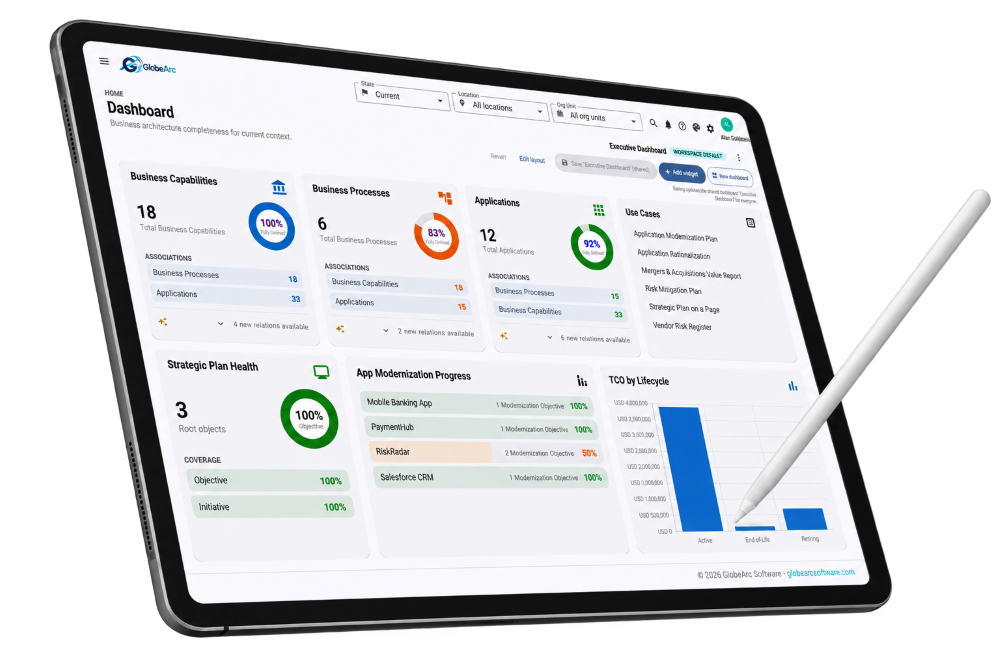
- Dashboards and widgets for bringing important information together
- Document templates for structured reporting
Use Case Blueprints can also expose gaps in the existing metamodel and help teams establish missing object, association, and property types. This lets teams begin with the question they need to answer instead of expecting users to master the entire architecture model first.

How Do Dynamic Queries and Search Help Teams Find What They Need?
GlobeArc provides search and query capabilities for moving through connected architecture information without manually navigating a large repository. Global Search helps locate records quickly, while "Related objects" and "Also exists" in reveal additional context around an object and where it appears.
For more structured questions, saved queries use a validated query structure rather than raw SQL. Teams can preserve useful queries and return to them as repository information changes, making the answer repeatable rather than dependent on another one-off data exercise.

How Quickly Can Organizations Bring Existing Data Into GlobeArc?
A connected enterprise architecture repository is only useful once it contains enough trustworthy information to support the questions an organization needs to answer. GlobeArc uses its metamodel to generate Excel import templates, helping teams bring existing objects and property values into the platform without manually recreating every record. Existing Visio process diagrams can also be imported and converted into BPMN process models in the repository.
Organizations can start with the information they already maintain and build greater depth over time. The GlobeArc team works with each customer during onboarding to plan how existing data, including the relationships between objects, is brought into the repository.
How Does GlobeArc Keep Repository Information Current?
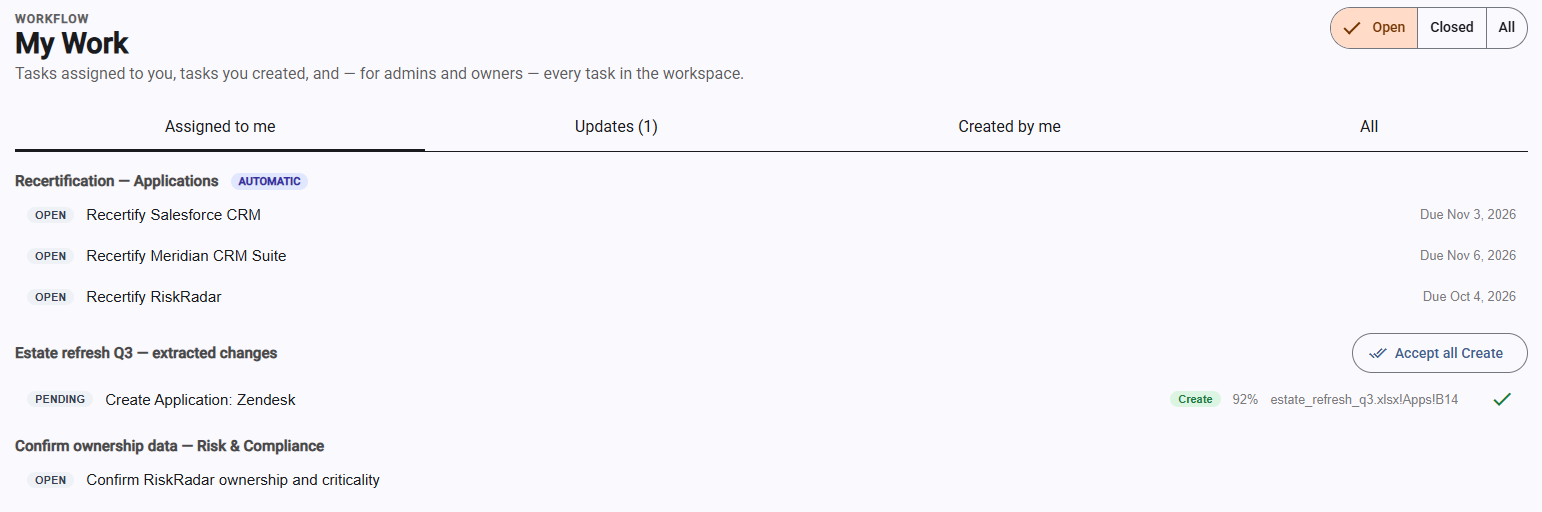
A repository is only useful while its information stays accurate. GlobeArc’s workflow automations can be set up for any object type to handle recurring governance work, such as periodic recertification of records or follow-up when required information is incomplete. The resulting tasks appear in each user’s My Work view, so data owners can see what needs their attention without someone chasing updates by email.
What Does One Connected View Change?
The point of a connected repository isn’t to put more information in one place. It’s to make the relationships between that information usable. It's to make the relationships between that information usable. With a shared foundation, teams can:
- Reduce duplicate architecture information across models and reports
- Trace dependencies across business and technology domains
- Reuse the same records across processes, capabilities, value streams, and application views
- Compare Current, Interim, and Target states
- Simulate processes and compare Current and Target variants
- Keep repository information current through workflow automations
- Analyze information across multiple visual model types
- Follow relationships from one enterprise object to another
- Ask repeatable questions using connected repository data
When processes, capabilities, applications, value streams, organizational structures, strategy, and other enterprise objects share the same underlying repository, teams can investigate questions across domains without first reconciling several versions of the organization. GlobeArc turns those connections into models, comparisons, analytics, queries, and reports, giving architecture and process teams a common foundation for understanding the organization as it is today and planning what it needs to become.

We’re here to help you bring clarity to complexity.