
Application Modernization and Landscape Management
Plan Your Technology Future
Application Landscape Management for Modernization Planning
Application landscape management gives organizations a current, connected view of their technology estate and a structured way to plan what that estate should become. GlobeArc brings applications, business capabilities, organizational context, integrations, costs, and architecture states together so teams can understand where technology is concentrated, how applications depend on one another, and where modernization attention is needed.
Application rationalization and modernization answer different questions. Rationalization helps decide whether each application should be tolerated, invested in, migrated, or eliminated. Modernization starts with the shape of the estate itself: what exists today, how it supports the business, how applications are connected, what needs to change, and how the Current landscape should evolve through Interim states toward the Target architecture.


What Is an Application Landscape?
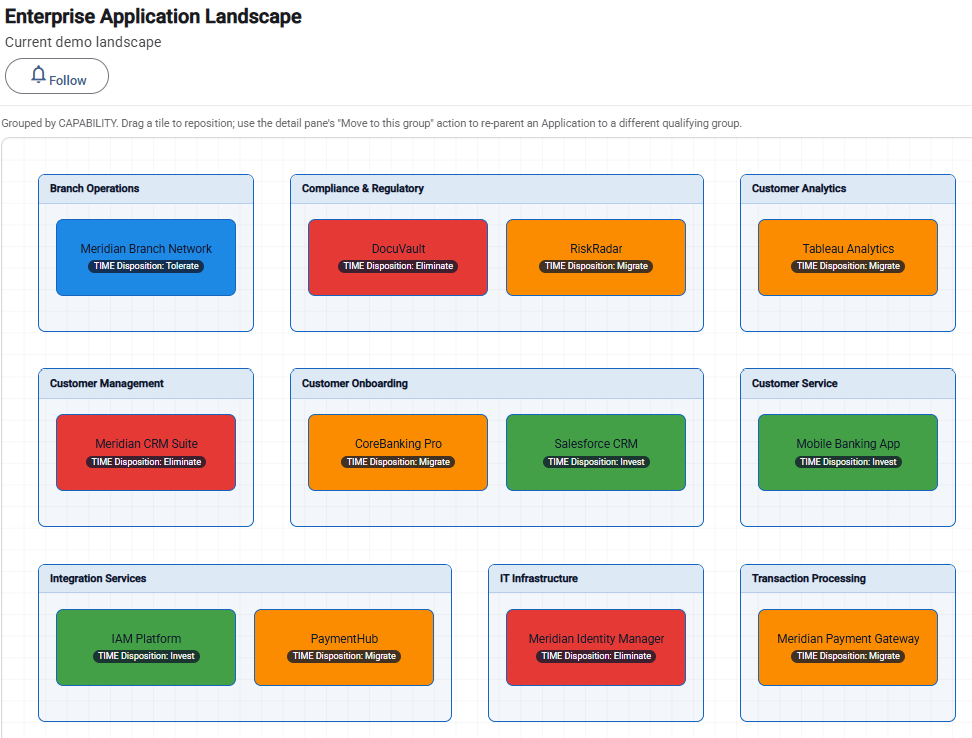
An application landscape is a structured view of the applications an organization uses and the business and technology context around them. It helps teams see the estate as a connected system rather than as an application inventory or a collection of manually maintained diagrams.
A useful landscape can show where applications sit across business capabilities and organizational structures, while related views provide further context around integrations and architecture states. This gives enterprise architects a foundation for understanding the present estate before designing its future shape.
Why Does Application Modernization Start With the Current Landscape?
Modernization decisions are difficult to plan when teams don't have a reliable picture of the technology estate they already operate. Application inventories may exist, but the relationships between applications, capabilities, integrations, organizational units, and future architecture plans are often spread across different files and tools.
Common modernization drivers include:
- Accumulating technical debt
- Aging applications or technologies
- Technology lifecycle concerns
- Cloud and platform transformation
- Changing business capabilities
- Organizational restructuring
- Integration complexity
- Mergers and acquisitions
- Shifts in technology strategy
- The need to move toward a defined Target architecture
Mapping the Current landscape gives teams a baseline from which those drivers can be assessed, and modernization priorities can be discussed.
Who Usually Owns Application Modernization Planning?
Enterprise architects commonly lead the architecture analysis because modernization requires a cross-portfolio view of applications, business capabilities, integrations, and future-state design. CIOs, CTOs, application owners, platform teams, and transformation leaders may then use that analysis to make investment and sequencing decisions.
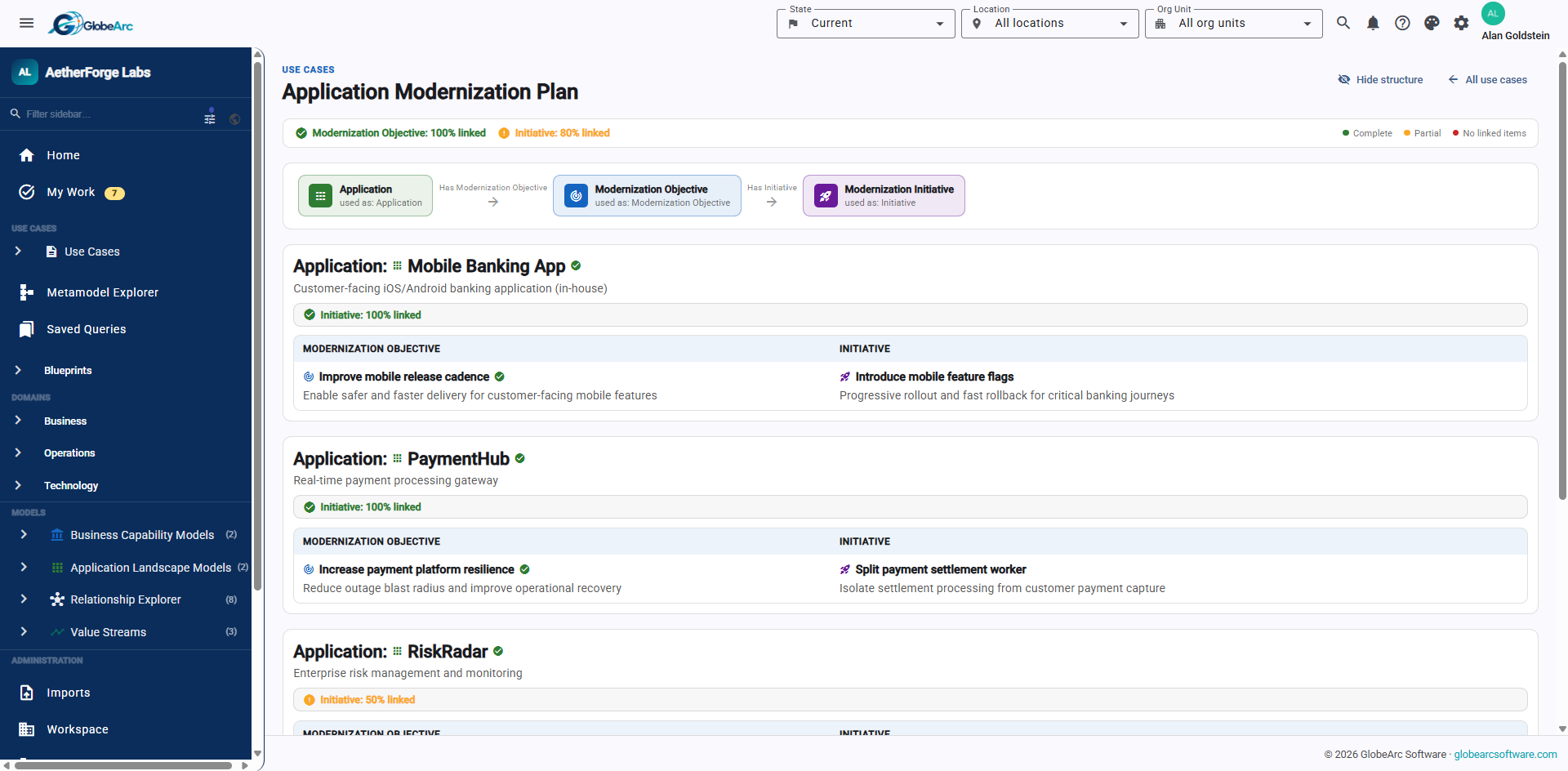
The initiative is broader than deciding whether an individual application stays or goes. Teams need to understand how changes reshape the overall estate and whether the resulting landscape moves the organization closer to its intended architecture.
Why Do Traditional Application Landscape Diagrams Fall Short?
A manually maintained diagram starts becoming outdated as soon as the underlying application estate changes. When application inventories, integration diagrams, capability maps, and modernization plans are maintained separately, teams spend time reconciling different versions of the same environment.
GlobeArc generates Application Landscape Models from repository data, so the landscape is a view of connected architecture information rather than a standalone drawing. The same application records can contribute to capability views, Current and Target landscapes, integration analysis, heat maps, queries, and other architecture work.
That changes the maintenance model. Instead of redrawing the organization every time the data changes, teams can work from the connected information that describes it.
How Do You Map an Application Landscape?
Applications can be organized into a landscape using supported grouping dimensions, allowing teams to examine the estate from the perspective most relevant to the architecture question. This turns a flat inventory into a visual structure that makes application distribution and concentration easier to understand.
A landscape can help teams investigate:
- Where applications sit across business capabilities
- How applications are distributed across organizational contexts
- Where application concentration is high
- How cost is distributed across the landscape
- How the Current estate differs from the Target estate
- Which parts of the landscape deserve deeper investigation

How Does Capability Mapping Add Business Context to the Application Landscape?
Connecting applications to business capabilities shows what parts of the business the technology estate supports. Instead of discussing an application only in terms of its technology, teams can examine where it contributes to the organization's operating capabilities.
This makes modernization planning more meaningful. A cluster of applications around an important capability may indicate complexity worth investigating, while a proposed technology change can be considered in the context of the business capability it supports.
Capability mapping also provides a useful bridge between business architecture and application portfolio planning. Modernization becomes a question of how the technology estate should evolve to support the business, not simply which technologies appear old.

How Can Teams Identify Aging or Problematic Applications?
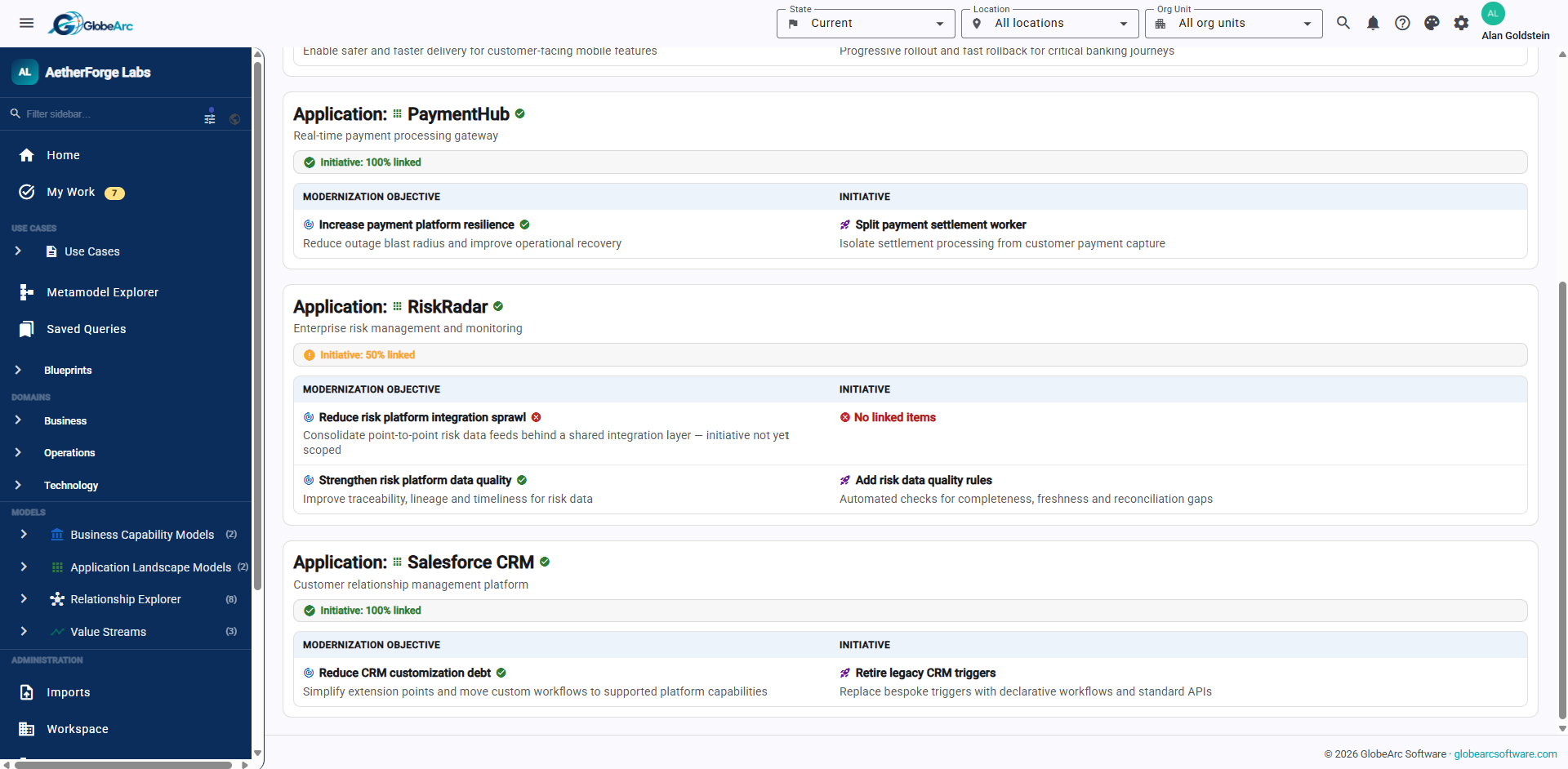
Modernization candidates become easier to investigate when application information can be viewed in the context of the wider landscape. Technical condition, cost, lifecycle information, capability relationships, and other configured properties can help teams identify areas where the estate warrants attention.
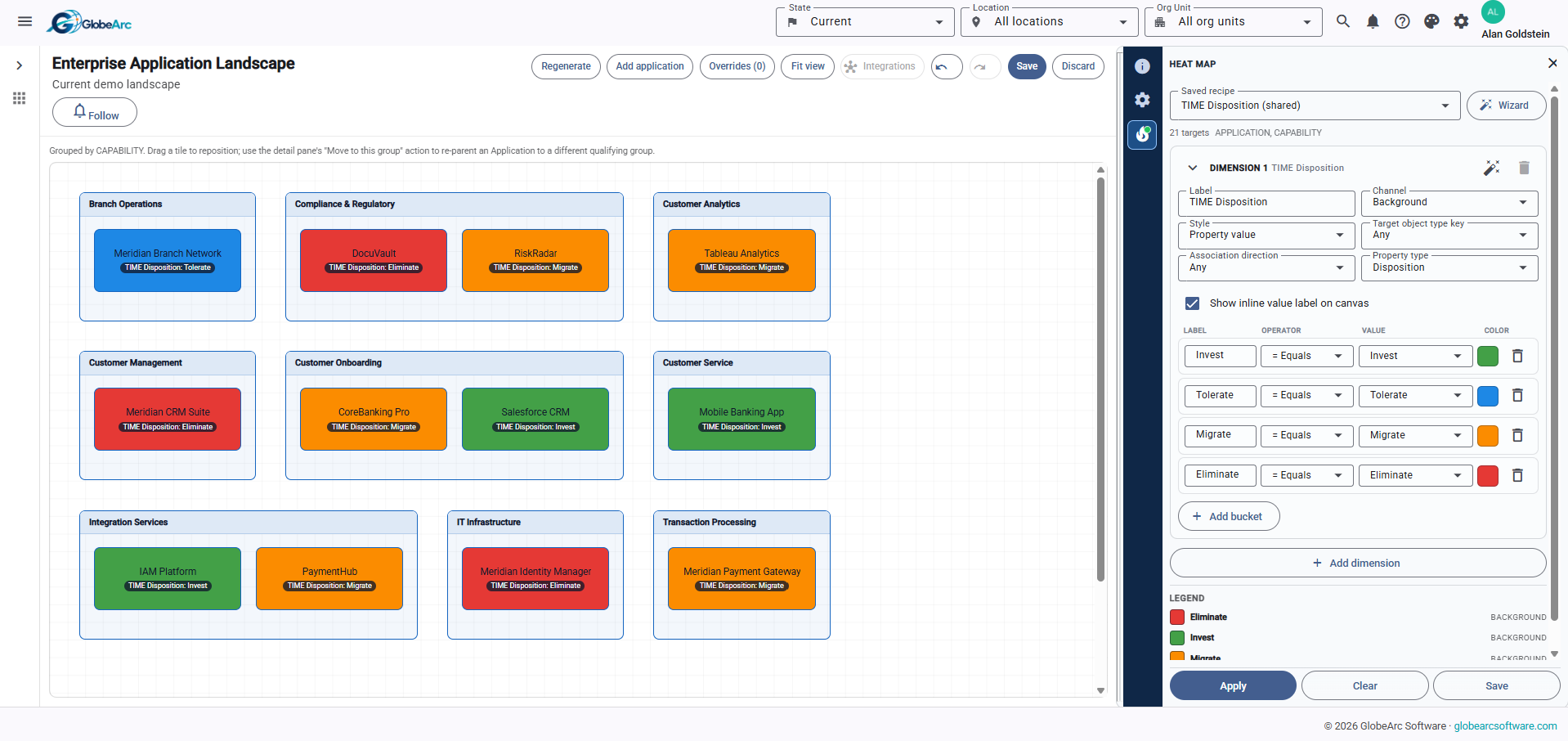
Heat maps add an analytical layer to the visual landscape. The same heat-map engine used elsewhere in GlobeArc can be applied to Application Landscape Models to expose patterns such as application concentration or cost exposure.
This doesn't automatically determine which application should be retired. That decision belongs to application rationalization. Here, the objective is to understand where modernization pressure exists and what parts of the landscape require deeper analysis.

How Does Technology Lifecycle Information Support Modernization?
Technology lifecycle information helps teams recognize where aging or changing technology may create pressure for application modernization. When lifecycle or technical-fit information is captured as part of the architecture data, it can be considered alongside application relationships, business context, and the future architecture.
The value comes from connecting lifecycle concerns to the estate rather than maintaining an isolated list of aging technologies. Teams can see which applications require attention and then investigate the business capabilities and integrations connected to them.
It provides the connected architecture context teams need to evaluate the implications and prioritize action.

How Do Interim States Support Application Modernization Planning?
Interim states let teams represent meaningful architecture stages between the Current and Target estate. They provide a way to describe transitional architecture without pretending that a complex modernization program moves directly from today's environment to its final design.
This is useful when dependencies mean that changes need to occur in stages. Architects can model the relevant architecture at different states and compare them to understand how the estate changes along the way. Interim states provide architecture context rather than project scheduling.
How Can Integration Dependencies Inform Migration Sequencing?
Dependency information helps teams determine which changes may need to happen before, alongside, or after others. An application with several critical integrations, for example, may require more coordination than an isolated system even when both are modernization priorities.
GlobeArc provides the relationships, integration context, architecture states, and comparison capabilities needed to inform those sequencing decisions. Architects can use that evidence to identify constraints and discuss a practical transition path.
The migration sequence remains a planning decision, informed by this evidence.

How Does GlobeArc Compare Current and Target Application Landscapes?
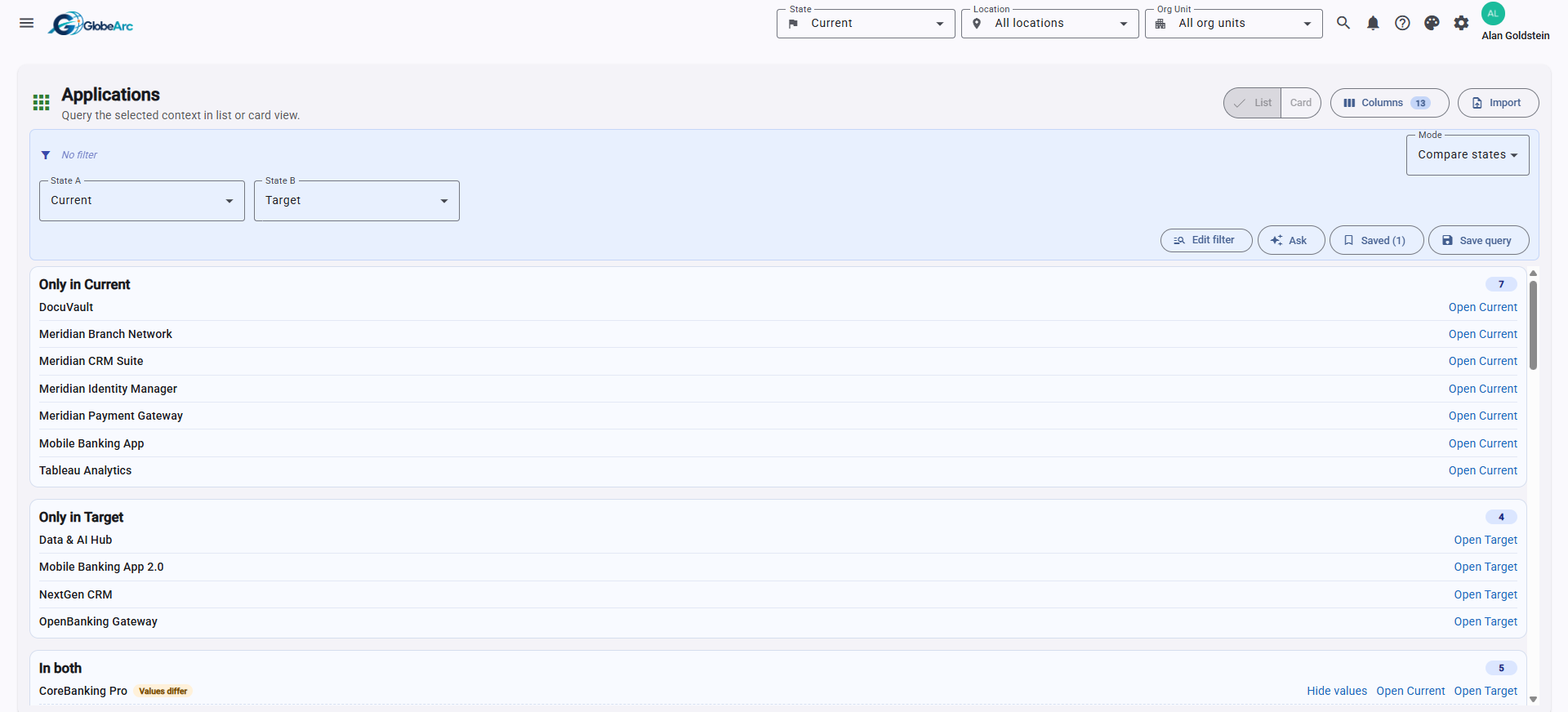
Current, Interim, and Target states are native architecture contexts, allowing teams to represent how the application estate exists today and how they intend it to change. This keeps future-state planning connected to the same repository instead of separating the Target architecture into another set of diagrams.
Teams can use Compare States to identify structural and property differences between architecture states. Application Landscape Models can also be created for Current and Target perspectives, giving architects a visual way to examine how the shape of the estate is expected to evolve.
That can help answer questions such as:
- Which applications exist in Current but not Target?
- What appears in the Target landscape that doesn't exist today?
- Which application properties change?
- How does capability coverage change?
- How does the integration estate change?
- Where does the Target architecture reduce or introduce complexity?
How Do You Visualize Application Dependencies and Integrations?
Integration relationships reveal how applications depend on one another and where a modernization decision could affect the wider estate. GlobeArc can model application-to-application integrations with information such as protocol, direction, frequency, and criticality, providing additional context for dependency analysis.
The standalone Integration View lets teams focus on the integration neighborhood around an individual application. This is particularly useful when an application is being changed, replaced, or migrated, and the team needs to understand which connected systems may require attention.
Teams can investigate questions such as:
- Which applications integrate with this system?
- In which direction does information flow?
- How frequently does the integration operate?
- How critical is the connection?
- Which dependencies need to be considered during modernization?

How Can Heat Maps Help Prioritize a Modernization Roadmap?
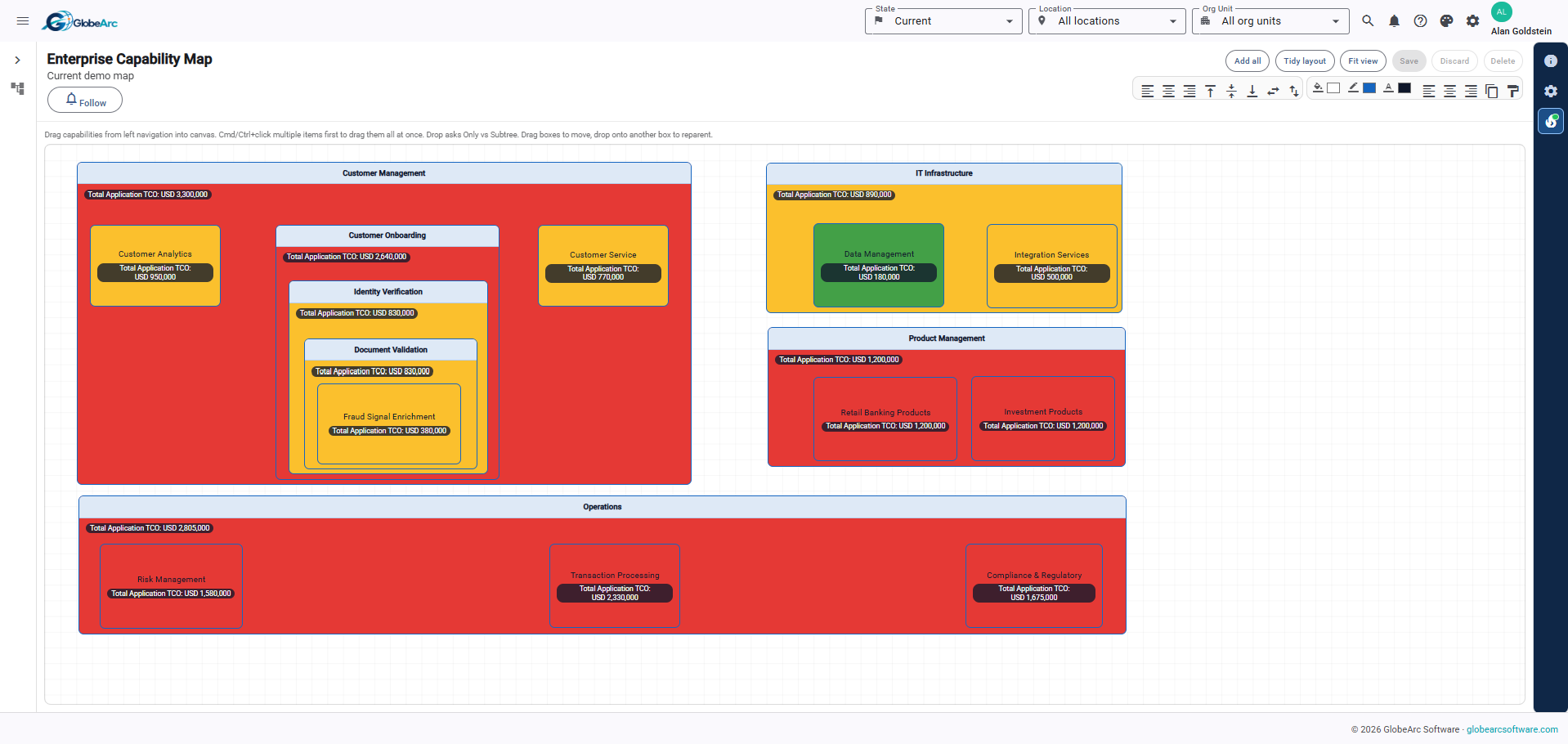
Heat maps help teams identify where portfolio characteristics are concentrated, giving modernization planners a faster way to focus attention across a large application estate. Rather than reviewing every application individually, teams can visually explore areas of concentration and exposure before investigating the underlying applications.
Saved heat map recipes for Application Landscapes include:
- Application Count Exposure
- Cost Exposure
- Cycle Time Exposure
Teams can also use other shared recipes, the Heat Map Wizard, or a heat map built from scratch. These views can contribute to roadmap prioritization when combined with technical concerns, lifecycle information, business importance, integration dependencies, and Target-State objectives. The heat map provides evidence for prioritization, rather than automatically generating the roadmap.
Modernization Roadmap
How Does GlobeArc Support a Roadmap Toward the Target Architecture?
A modernization roadmap can be informed by comparing Current, Interim, and Target architecture states and examining the dependencies that constrain change. This gives teams a connected architecture foundation for deciding what needs to change and in what order.
A practical modernization planning workflow can move through:
1
Build or Import the Current Application Inventory
Create a comprehensive inventory of existing applications or import available data to establish a reliable foundation for enterprise architecture planning.
2
Connect Applications to Business Capabilities
Link applications to the business capabilities they support to understand how technology enables business operations and strategic objectives.
3
Map Important Application Integrations
Document key integrations and dependencies between applications to understand how data flows across systems and where critical connections exist.
4
Visualize the Current Application Landscape
View the application estate in a structured visual format to understand the existing environment, identify relationships, and gain a clear overview of the technology landscape.
5
Identify Areas Requiring Attention
Use heat maps and application properties to highlight risks, outdated technologies, and opportunities for improvement across the application portfolio.
6
Define the Target Application Landscape
Model the intended future state of the application estate to align technology investments with business goals, strategic priorities, and desired capabilities.
7
Plan Interim Architecture States
Define intermediate architecture states when transformation requires multiple stages, helping teams manage complex changes through a structured transition plan.
8
Compare Architecture States
Compare Current, Interim, and Target states to identify application changes, gaps, additions, and removals needed to achieve the desired architecture.
9
Investigate Integration Dependencies
Analyze dependencies around affected applications to understand the potential impact of changes and identify integration risks before implementing transformation initiatives.
10
Prioritize Modernization and Migration
Use architecture insights and dependency analysis to prioritize modernization initiatives, sequence migrations, and support informed decisions about the transformation roadmap.
What Data Is Needed for Application Landscape Management?
A useful first landscape can be created from relatively focused information. Applications and the business capabilities they support provide a strong starting point, while additional relationship and property data increases the depth of modernization analysis.
Useful inputs can include:
- Application inventory
- Business capability relationships
- Organizational context
- Application costs
- Technical-fit or lifecycle information
- Application-to-application integrations
- Integration criticality and characteristics
- Current, Interim, and Target state information
Application objects and property values can be brought into GlobeArc through structured Excel import. The GlobeArc team helps plan how existing integration and relationship data is brought in during onboarding.
What Outputs Support Application Modernization Decisions?
GlobeArc provides portfolio views, integration context, state comparisons, heat maps, and dependency information that help teams evaluate how the application estate should change. Because these outputs draw from the same connected repository, users can move from a high-level modernization view into the underlying applications, relationships, and architecture context without reconciling separate sources.
Modernization outputs can include:
- Current Application Landscape Models
- Target Application Landscape Models
- Application-to-capability mapping
- Application concentration views
- Cost exposure heat maps
- Integration relationships
- Application Integration Views
- Current versus Target comparisons
- State-level property changes
- Dependency context for modernization planning
These outputs give enterprise architects and technology leaders a shared evidence base for discussing modernization priorities, sequencing, and future-state design.
How Is Application Modernization Different From Application Rationalization?
Application rationalization determines what should happen to individual applications, while application modernization and landscape management focus on what the technology estate looks like today and what it needs to become.
Rationalization asks questions such as:
- Which applications should we keep?
- Where can we consolidate?
- Which applications should be replaced or retired?
- Which applications deserve further investment?
Modernization asks a different set of questions:
- What does our current application landscape look like?
- How are applications connected?
- Which business capabilities do they support?
- Where is technical debt or lifecycle pressure concentrated?
- What should the Target landscape look like?
- What dependencies affect the transition?
- Which changes should be prioritized as we move toward that Target?
The two solutions naturally inform each other, but they shouldn't be treated as the same exercise. Rationalization produces disposition decisions. Modernization uses the wider estate, its dependencies, and its future shape to plan change.
What Other EA and BPM Solutions Support Modernization Planning?
Application modernization often intersects with rationalization, transformation planning, M&A integration, and vendor exposure. The same connected architecture information can support those adjacent questions without requiring teams to rebuild the estate for each use case.
Related solutions include:
- Application Rationalization
- Transformation and Target-State Planning
- Mergers and Acquisitions Integration
- Vendor Concentration and Risk
Each use case can work from connected enterprise information, allowing the organization to reuse what it already knows instead of starting another disconnected assessment.

Who Uses GlobeArc for Application Modernization and Landscape Management?
Enterprise architects typically lead the architecture work because they need to understand the application estate as a connected system and define how it should evolve. CIOs, CTOs, application owners, platform teams, and transformation leaders can use the resulting views to inform investment priorities and modernization planning.
See Your Current and Target Application Landscapes in GlobeArc
Modernization starts with knowing what you have, how it connects, and what needs to be different. GlobeArc gives teams a connected view of applications, capabilities, integrations, architecture states, and analytical context so they can understand today's estate and build a clearer picture of where it needs to go.
Request a demo to explore a Current Application Landscape, investigate integration dependencies, compare it with a Target state, and see how GlobeArc can provide the architecture evidence behind modernization priorities and roadmap decisions.
We’re here to help you bring clarity to complexity.